A2UI Guide
A2UI (Agent to UI) enables an agent to return structured UI events that clients can render directly instead of only natural language. When a product expects an agent to output menus, forms, buttons, cards, and other UI elements, and then continue the reasoning loop after the user interacts with them, plain-text replies alone cannot reliably carry UI structure, action context, and state updates. A clear protocol is therefore needed across model output, server-side streaming, and frontend rendering.
tRPC-Agent-Go ships with out-of-the-box A2UI support. It uses planner/a2ui to inject A2UI protocol constraints and schemas into the model during planning, and server/agui/translator/a2ui to translate AG-UI text streams into A2UI RAW events. It continues to reuse the AG-UI server, SSE transport, and session capabilities so the server can generate UI dynamically, the frontend can send userAction events back, and the full Agent-to-UI loop stays intact.
It is important to understand that A2UI is built on top of AG-UI. It constrains the message payload rather than the transport layer. Requests still use AG-UI's RunAgentInput, and responses still use the AG-UI event stream. The only difference is that the text content inside the stream is constrained to A2UI JSONL and then translated by the A2UI Translator into RAW events that the frontend can consume.
Getting Started
This section walks through a minimal example to help you quickly understand how to integrate A2UI with tRPC-Agent-Go.
This example is based on the A2UI demo in this repository. The complete code example is available at examples/a2ui/server/default, and the frontend demo is available at examples/a2ui/client.
Prerequisites
- Go 1.24+
- An accessible LLM service
- If you want to preview the rendered UI directly in a browser, serve
examples/a2ui/clientwith any static file server
Set the model service environment variables before running the example.
Code Examples
The following two core snippets show how to build an agent with A2UI support and how to start an A2UI service.
Agent snippet
This snippet builds a minimal A2UI agent. The key is attaching the A2UI Planner with llmagent.WithPlanner(a2ui.New()), which makes the model follow the A2UI client-event schema, server-event schema, and JSONL output constraints during generation.
Server snippet
This snippet exposes an A2UI endpoint through the AG-UI service. The key is wrapping the default AG-UI Translator Factory with a2uitranslator.NewFactory, which translates A2UI JSONL text emitted by the model into RAW events and pushes them to the client.
Start the service
Once started, the service listens on:
If you want to inspect the rendered UI directly in a browser, start the example frontend in another terminal.
Open in your browser:
Interaction example
Under the hood, the A2UI route still accepts AG-UI's RunAgentInput. Regular user input is still carried by the last role=user message.
The calculator example below illustrates the interaction flow. Because planner/a2ui currently injects the standard Catalog schema by default, and the sample frontend in this repository mainly renders selection-style controls from the standard Catalog via MultipleChoice, the example below uses the single-select form of MultipleChoice to represent the operator selector.
When executed on the server side, the AG-UI event stream includes runtime control events as well as Raw events generated by the A2UI Translator; the payload of these events consists of A2UI JSON objects, with the source attribute set to a2ui/v0.8.
The examples below are line-wrapped for readability. In actual output, each JSON object should occupy its own line.
The following JSON initializes the calculator form data model by assigning initial values to the two input fields and the default operator.
The following JSON declares the component tree of the calculator UI, including the title, input fields, operator selector, and submit button.
The following JSON tells the client to begin rendering the calculator surface defined above, using root as the root component.
When the user enters 12 and 7 in the frontend, selects multiplication, and clicks the button, the client encodes the userAction event as a JSON string and sends it back to the same A2UI route as the next role=user message. The example below uses the callback format of the sample frontend in this repository.
The following JSON shows a complete RunAgentInput request whose last role=user message carries the serialized userAction event.
The client renders as shown below:

The same threadId should be reused throughout a single interaction flow so that the server continues reasoning and rendering within the same session.
Core Concepts
A2UI integration involves four core concepts:
- A2UI Planner: Uses
planner/a2uito append A2UI constraints during planning. By default it injects JSONL output rules, the Client-to-Server event schema, and the standard Server-to-Client component catalog schema. - A2UI Translator: Uses
server/agui/translator/a2uito wrap the default AG-UI Translator, split the text stream line by line into JSONL records, and convert them into AG-UIRAWevents. - Client-to-Server events: Used to send frontend interactions back to the agent. The default schema supports two event types:
userActionanderror. - Server-to-Client events: Used to send agent-generated UI to the client. By default, only four message types are allowed:
beginRendering,surfaceUpdate,dataModelUpdate, anddeleteSurface.
A typical A2UI execution flow usually looks like this:
- The client sends
RunAgentInputto the AG-UI route, with the last message set torole=user. - The A2UI Planner appends protocol constraints and schemas to the system prompt, constraining the model to emit strict A2UI JSONL.
- The model outputs A2UI JSON objects through a text message stream.
- The A2UI Translator splits the text message stream by line and converts each line into an AG-UI
RAWevent. - The frontend consumes the
RAWevents and renders the UI. When the user interacts again, the frontend sends auserActionback to the server, closing the loop.
The default Server-to-Client message types are listed below:
| Message type | Purpose | Required fields |
|---|---|---|
beginRendering |
Tells the client to start rendering a surface and specifies the root component | surfaceId, root |
surfaceUpdate |
Updates the component tree of a surface | surfaceId, components |
dataModelUpdate |
Updates the data model of a surface | surfaceId, contents |
deleteSurface |
Deletes a surface | surfaceId |
The default Client-to-Server message types are listed below:
| Message type | Purpose | Required fields |
|---|---|---|
userAction |
Sends a user-triggered component action back to the server | name, surfaceId, sourceComponentId, timestamp, context |
error |
Reports a client-side error back to the server | The structure is open and has no fixed required fields |
If you want to understand A2UI concepts and message semantics in more detail, refer directly to the official documentation. Because the current tRPC-Agent-Go implementation uses a2ui/v0.8 message semantics and schemas by default, we recommend consulting the v0.8 specification first.
- Protocol and background: What is A2UI?, Core Concepts
- Message flow and message types: Data Flow, Message Reference, A2UI v0.8 Protocol
- Components, data binding, and catalogs: Components & Structure, Data Binding, Catalogs
- Frontend action callbacks: Client-to-Server Actions
Usage
Use the A2UI Planner to constrain model output
The integration point for the A2UI Planner is attaching planner/a2ui to an agent. For llmagent, the most direct approach is to inject it with llmagent.WithPlanner(a2ui.New()) when constructing the agent.
By default, a2ui.New() injects three kinds of constraints:
- A2UI JSONL output rules
- Client-to-Server schema
- Server-to-Client-with-Standard-Catalog schema
Among them, the default output rules require the model to satisfy the following conditions:
- Server-to-client output must be JSONL-compatible.
- Each text message must contain exactly one complete JSON object.
- A single JSON object must not be split across multiple text-message chunks.
- Every message must be independently valid JSON.
- Only four top-level keys are allowed:
beginRendering,surfaceUpdate,dataModelUpdate, anddeleteSurface. - No Markdown fences, code blocks, or extra explanatory text may be emitted.
If you need to override the default behavior, you can use the following options:
| Option | Purpose |
|---|---|
WithInstruction |
Sets a custom Planner instruction. This replaces the default instruction instead of appending to it. |
WithClientToServerSchema |
Sets the Client-to-Server schema. |
WithServerToClientWithStandardCatalogSchema |
Sets the Server-to-Client schema for the default standard component catalog. |
WithClientCapabilitiesSchema |
Appends a client capabilities schema. |
WithServerToClientSchema |
Appends a custom Server-to-Client schema. |
WithStandardCatalogDefinition |
Appends a standard catalog definition. |
WithCatalogDescriptionSchema |
Appends a catalog description schema. |
Example:
When you override the default instruction with WithInstruction, you must preserve the A2UI JSONL constraints yourself. Otherwise the model may emit ordinary natural language, and the downstream Translator will no longer be able to parse the output reliably.
Use the A2UI Translator to expose an A2UI event stream
The A2UI Translator wraps the default AG-UI Translator and converts text messages produced by the model into A2UI RAW events. In practice, you usually create the default Translator Factory first, then wrap it with a2uitranslator.NewFactory.
The default behavior of the A2UI Translator is as follows:
- Text-message start, content, and end events drive its internal JSONL parsing state.
- Text content is split by line. Each line corresponds to one A2UI message and is converted into one
RAWevent. - Run-start, run-finish, and run-error events pass through unchanged.
- Other non-text AG-UI events are dropped by default.
- The translated
RAWevents always usea2ui/v0.8assource.
During parsing, the Translator ignores blank lines, trims whitespace, and supports a single logical line arriving across multiple chunks. If a line is not valid JSON, it is still wrapped into a RAW event as a string, but it is no longer a valid A2UI message. This usually means the model violated the protocol constraints.
Customize the pass-through strategy for non-text events
If you want to keep certain non-text AG-UI events in the A2UI stream, you can customize the pass-through rule with WithPassThroughEventHook. The following example additionally forwards Custom events.
This hook affects only non-text events that would otherwise be dropped by default. It does not affect control events such as run-start, run-finish, and run-error, which already pass through unchanged.
Construct Client-to-Server requests
A2UI requests still use the AG-UI RunAgentInput structure, so the last message should remain role=user. Plain-text input can be placed directly in content. User interaction events are usually assembled as A2UI Client-to-Server JSON first, then serialized as a string and written into content.
A plain-input example is shown below. Here, content is still only a natural-language prompt. Whether the model finally produces a form, a button, or a card is still decided by the model under A2UI constraints.
The following JSON shows the simplest request body, which contains only natural-language user input.
A userAction example is shown below. It continues the same binary calculator example and indicates that the user has already entered two operands and clicked the Calculate button.
The following JSON shows a complete request that includes userAction. The content field in the request body contains the serialized client event string.
The sample frontend in this repository binds input components to the data model, then resolves path and writes the current values into context when the button action is triggered. Numeric inputs are still sent back as strings by default, and the server can convert them according to its own conventions.
If the client needs to report its own errors, it can also send an error event. Its payload structure is intentionally open for business-side extension, for example:
The following JSON only shows the payload structure of the error event itself. In an actual integration, you would usually serialize it and place it into RunAgentInput.messages[].content.
Construct Server-to-Client output
A2UI server output must follow JSONL, with exactly one JSON object per line, and each object may contain only one top-level action key. The binary calculator example below continues with a more form-oriented output structure.
The following JSON initializes the data model for the form surface by preparing initial values for the two numeric inputs and the default operator.
The following JSON defines the full calculator UI structure and additionally includes text components for displaying the result.
The following JSON tells the client to start rendering the UI. The client mounts the full component tree beginning at the root component.
The following JSON updates the data model of the result area after the calculation finishes. Here the result is written to /result/value.
The following JSON tells the client to delete the calculator surface, after which the UI is removed from the page.
When writing output, keep the following rules in mind:
surfaceUpdateis used to provide a full component tree or a component set after an incremental update.dataModelUpdateis used to initialize or update the data model. Every item incontentsmust containkeyand one correspondingvalue*field.beginRenderingdeclares the surface and its root component. In practice, you usually sendsurfaceUpdatefirst, along with any necessarydataModelUpdate, and then sendbeginRendering.deleteSurfacetells the client to remove a surface.- If you are building a form with the standard Catalog, single-select controls can usually be expressed with
MultipleChoiceplusmaxAllowedSelections: 1. If you need true dropdowns or other custom components, extend the catalog with a custom definition. - Do not mix explanatory text, Markdown, code fences, or extra fields at the top level.
If you use the sample frontend in this repository, it directly consumes these RAW events and renders surfaceUpdate, dataModelUpdate, and deleteSurface into visible UI and interaction behavior. The full sample frontend code is available at examples/a2ui/client.
Combine with AG-UI capabilities
A2UI does not replace AG-UI's session, routing, or transport capabilities. Instead, it adds a layer of UI protocol constraints on top of them. You can continue to reuse the following AG-UI capabilities:
- Maintain multi-turn interactions within the same session through
threadId - Continue using the AG-UI SSE server implementation
- Reuse server-side capabilities such as
SessionService, cancellation, and message snapshots - Continue extending
userID, session storage, and event translation logic through custom Runner options
For full AG-UI usage details, see the AG-UI Guide. For the general Planner capabilities, see Planner.
Best Practices
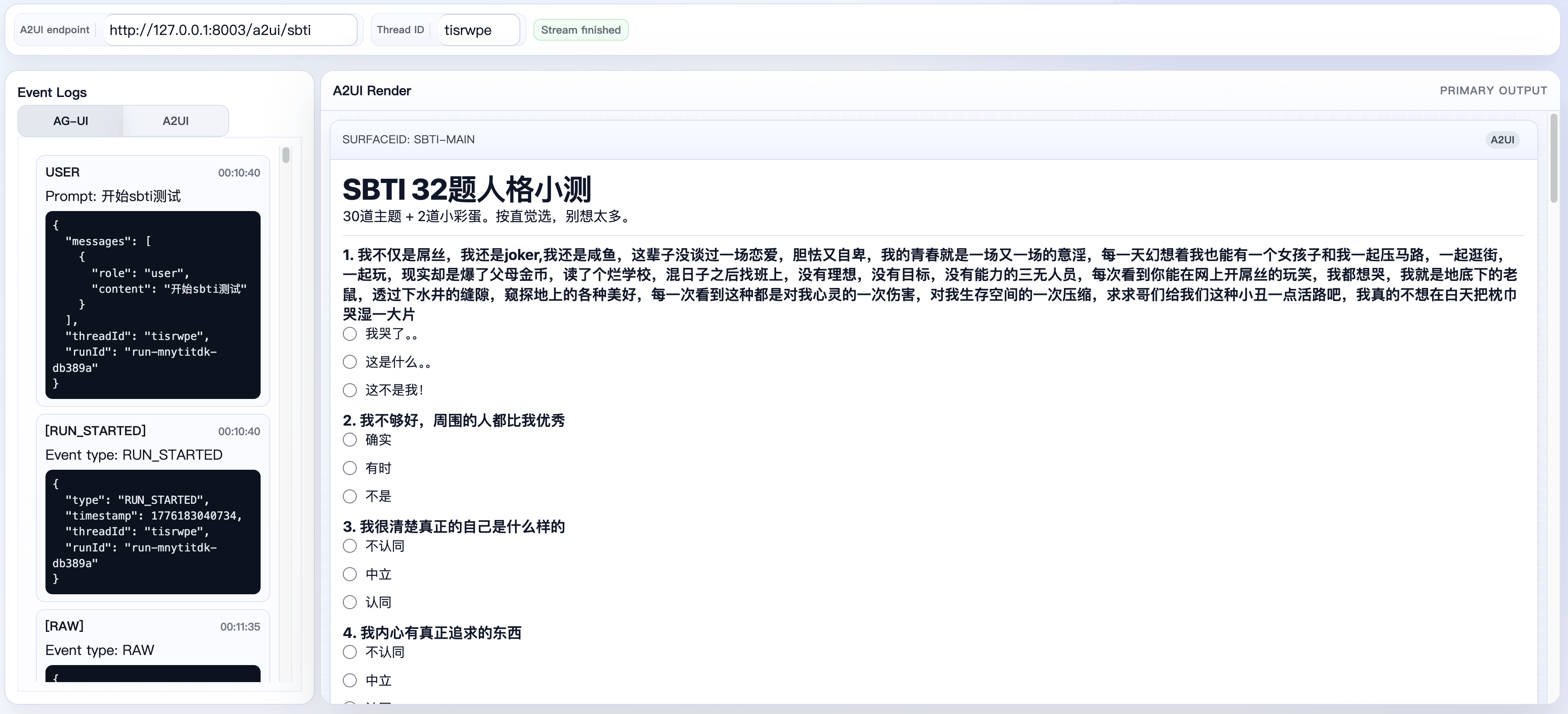
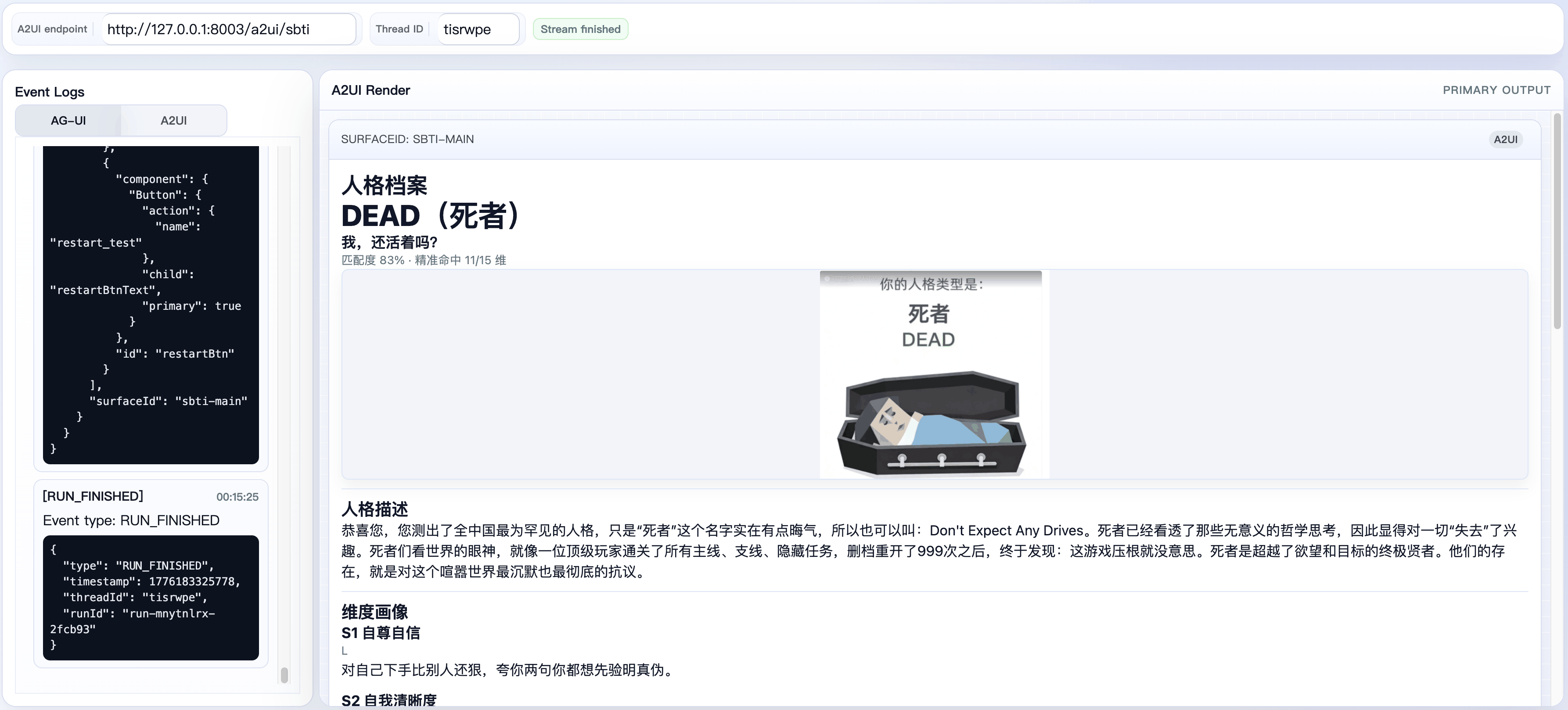
SBTI Personality Test
The complete example is available at examples/a2ui/server/sbti, and the frontend example is available at examples/a2ui/client.
Quiz page:
Result page:
- It splits business logic from UI rendering into two agent nodes.
sbti_directorowns the fixed question bank, scoring, and type matching, whilesbti_a2ui_rendereronly turns structured state into A2UI. - It drives the key contracts through static assets.
director_instruction.txt,director_output_schema.json,renderer_instruction.txt, andtype_profiles.jsonare all fixed files, so business rules do not drift into scattered code paths. - It keeps a stable interaction boundary. The questionnaire is carried by the standard
MultipleChoicecomponent with local data binding, so answering questions does not require a round trip for every click. Only explicit actions such assubmit_testandrestart_testtrigger another agent run.
If your use case also follows a "fixed rules + dynamic interface" pattern, this split is a good starting point:
- Use an upstream agent for rules, state, and result computation.
- Use a downstream A2UI agent only for rendering.
- Keep reference data, output schemas, and rendering constraints in static asset files.
- Keep the frontend centered on standard input components and explicit actions rather than business-specific client branches.