AG-UI Guide
The AG-UI (Agent-User Interaction) protocol is maintained by the open-source AG-UI Protocol project. It enables agents built in different languages, frameworks, and execution environments to deliver their runtime outputs to user interfaces through a unified event stream. The protocol tolerates loosely matched payloads and supports transports such as SSE and WebSocket.
tRPC-Agent-Go ships with native AG-UI integration. It provides an SSE server implementation by default, while also allowing you to swap in a custom service.Service to use transports like WebSocket and to extend the event translation logic.
Getting Started
Assuming you already have an agent, you can expose it via the AG-UI protocol with just a few lines of code:
Note: If WithPath is not specified, the AG-UI server mounts at / by default.
A complete version of this example lives in examples/agui/server/default.
For an in-depth guide to Runners, refer to the runner documentation.
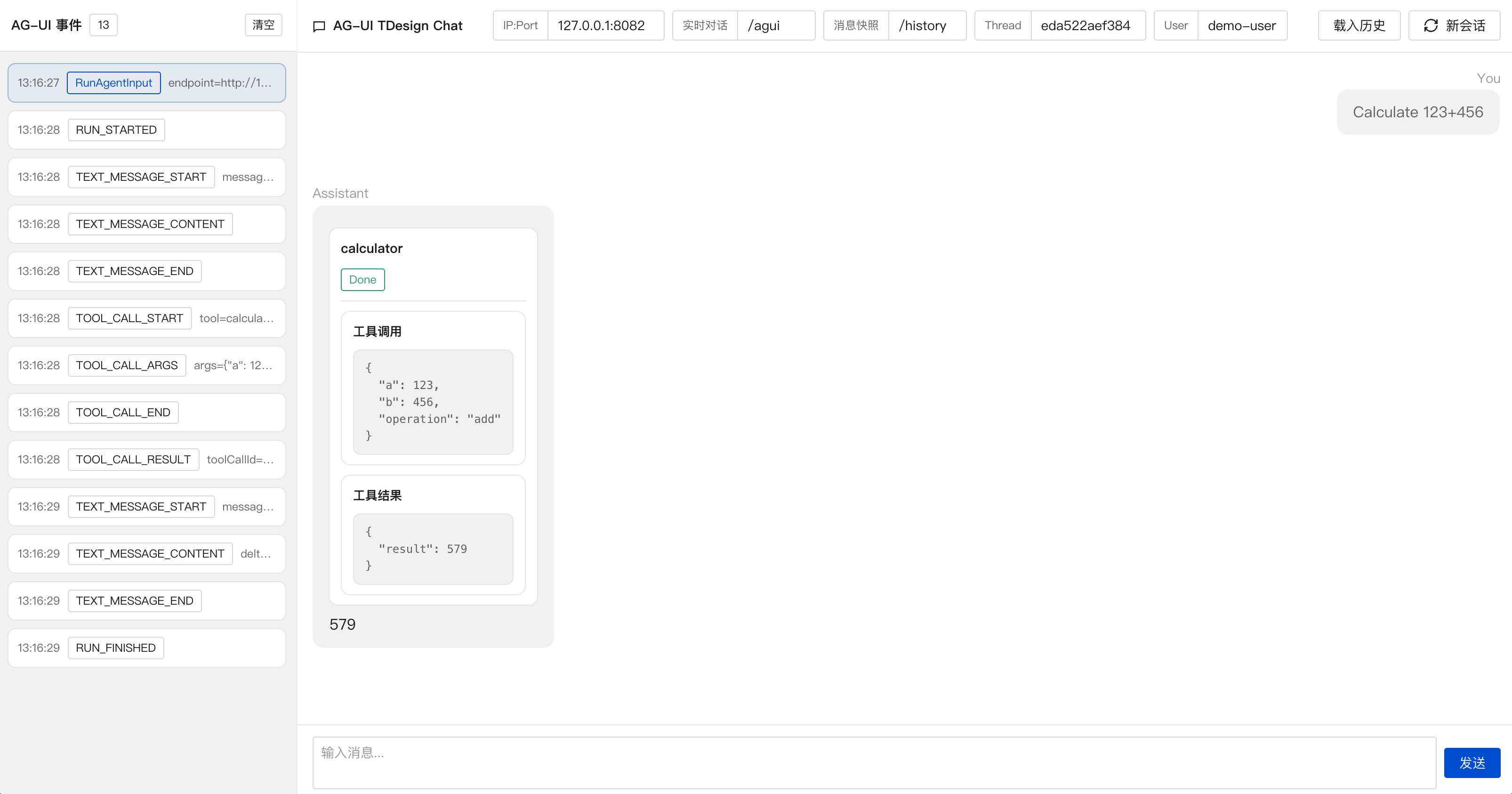
On the client side you can pair the server with frameworks that understand the AG-UI protocol, such as CopilotKit. It provides React/Next.js components with built-in SSE subscriptions. This repository ships with two runnable web UI samples:
- examples/agui/client/tdesign-chat: a Vite + React client built with TDesign that demonstrates custom events, graph interrupt approvals (human-in-the-loop), message snapshot loading, and report side panels.
- examples/agui/client/copilotkit: a Next.js client built with CopilotKit.
Core Concepts
RunAgentInput
RunAgentInput is the request payload for the AG-UI chat route and the messages snapshot route. It describes the input and context required for a conversation run. The structure is shown below.
For the full field definition, refer to AG-UI Go SDK.
Minimal request JSON example:
Real-time conversation route
The real-time conversation route handles a real-time conversation request and streams the events produced during execution to the client via SSE. The default route is / and can be customised with agui.WithPath.
For the same SessionKey (AppName + userID + sessionID), only one real-time conversation request can run at a time; repeated requests return 409 Conflict.
Even if the client SSE connection is closed, the backend continues executing until it finishes normally (or is cancelled / times out). By default, a single request can run for up to 1 hour. You can adjust this with agui.WithTimeout(d), and set it to 0 to disable the timeout; the effective deadline is the earlier of the request context deadline and agui.WithTimeout(d).
A complete example is available at examples/agui/server/default.
Connection close and cancellation semantics
By default, the AG-UI service decouples an Agent run from the request's cancellation signal. Even if the SSE connection is interrupted (e.g., due to a page refresh), and the request ctx is cancelled, the backend run will continue until it finishes normally, is actively cancelled via the cancellation route, or times out.
If you want the Agent run to stop when the request ctx ends (i.e., when the client disconnects or ctx is cancelled), you can explicitly enable this option:
Multimodal user input
For role=user messages, content can also be a multimodal array. Each item is an InputContent fragment:
type: "text"withtexttype: "binary"withmimeTypeand at least one ofurl,data(base64 string or base64 data URL), orid
Example (text + image URL):
Example (text + image data as base64 data URL):
The url parameter only supports binary input of type image/*; for other mimeTypes, please use data or id. The server will decode the data using standard base64 decoding. If you wish to send only the raw base64 string, you can remove the data:*;base64, prefix.
Cancel route
If you want to interrupt a running real-time conversation, enable the cancel route with agui.WithCancelEnabled(true) (disabled by default). The default route is /cancel and can be customised with agui.WithCancelPath.
The cancel route uses the same request body as the real-time conversation route. To cancel successfully, you must provide the same SessionKey (AppName + userID + sessionID) as the corresponding real-time conversation request.
What does cancel actually stop?
Cancel stops the backend run that is currently executing for the same
SessionKey (same AppName, resolved userID, and threadId).
This is useful when:
- The user clicks a “Stop” button in the UI.
- The SSE connection drops but you still want to stop the backend.
- You want to enforce server-side budgets (time, cost) and interrupt runaway runs.
Minimal cancel request
In most setups, you only need:
threadId(maps tosessionID)- Whatever fields your
UserIDResolverreads (oftenforwardedProps.userId)
You can also just resend the same JSON payload you used for the real-time run.
Example:
Typical responses:
200 OK: cancelled404 Not Found: no running run found for thatSessionKey(already finished or wrong identifiers)
After a cancel succeeds, the framework does not simply discard the protocol state that is still being finalized. Instead, it continues to emit any required closing events and tries to persist buffered AG-UI events from the aggregator into SessionService. As a result, subsequent /history requests see the last valid and consistent snapshot at the moment of cancellation rather than an incomplete intermediate state. For example, partial reasoning text that has already been produced is kept as a string, while a reasoning segment that never produced any text does not appear in the snapshot. You can adjust how long this post-run finalization window is allowed to take with agui.WithPostRunFinalizationTimeout(d), which defaults to 5s.
Message Snapshot route
Message snapshots restore conversation history when a page is initialised or after a reconnect. The feature is controlled by agui.WithMessagesSnapshotEnabled(true) and is disabled by default. The default route is /history, can be customised with WithMessagesSnapshotPath, and returns the event stream RUN_STARTED → MESSAGES_SNAPSHOT → RUN_FINISHED.
This route supports concurrent access for the same userID + sessionID (threadId), and you can also query the snapshot for the same session while a real-time conversation is running.
To enable message snapshots, configure the following options:
agui.WithMessagesSnapshotEnabled(true)enables message snapshots;agui.WithMessagesSnapshotPathsets the custom message snapshot route, defaulting to/history;agui.WithAppName(name)specifies the application name as the defaultAppName;agui.WithAppNameResolver(resolver)is optional and overridesAppNameper request;agui.WithSessionService(service)injects thesession.Serviceused to look up historical events;aguirunner.WithUserIDResolver(resolver)customises howuserIDis resolved, defaulting to"user".
When handling a message snapshot request, the framework extracts threadId as the SessionID from the AG-UI request body RunAgentInput, resolves userID using the custom UserIDResolver, prefers the appName returned by AppNameResolver, and falls back to agui.WithAppName(name) when the resolver returns an empty value. These values are used to build session.Key, read the persisted events from session storage, reconstruct the message list required by MessagesSnapshot, wrap it into a MESSAGES_SNAPSHOT event, and send matching RUN_STARTED and RUN_FINISHED events.
Example:
You can find a complete example at examples/agui/messagessnapshot.
The format of AG-UI's MessagesSnapshotEvent can be found at messages.
Translator interfaces
Before events are sent to the client, AG-UI translates internal framework events into protocol events. The core public extension interfaces are shown below:
Translator is responsible for turning internal events into AG-UI events. PostRunFinalizingTranslator extends it with the ability to emit any remaining protocol closing events during the finalization phase after a run ends, and to surface finalization errors when needed.
Advanced Usage
Custom transport
The AG-UI specification does not enforce a transport. The framework uses SSE by default, but you can implement the service.Service interface to switch to WebSocket or any other transport:
Custom translator
translator.New converts internal events into the standard AG-UI events. To enrich the stream while keeping the default behaviour, implement the translator.Translator interface introduced above and use the AG-UI Custom event type to carry extra data.
If your custom Translator maintains its own open streams, or simply wraps the default Translator and wants to preserve the built-in finalization behaviour on cancel and normal run completion, you should also implement translator.PostRunFinalizingTranslator so the framework can keep handling the closing events that need to be emitted after the run ends:
PostRunFinalizationEvents is invoked during the finalization phase after a run ends. If it returns an error, the framework will try to emit any finalization events that were already returned, and then emit a RunError so that problems in the finalization phase are surfaced to the client instead of being silently dropped.
For example, when using React Planner, if you want to apply different custom events to different tags, you can achieve this by implementing a custom Translator, as shown in the image below.

You can find the complete code example in examples/agui/server/react.
Expose source metadata for frontend grouping
When you enable inner Agent streaming, the frontend often needs to know which translated AG-UI event came from which sub-agent so it can group tool calls, tool results, and text output together.
Use agui.WithEventSourceMetadataEnabled(true) to attach compact source
metadata from the original trpc-agent-go event into the translated AG-UI
event's rawEvent field:
The same switch is also available at lower layers if you build the stack manually:
aguirunner.WithEventSourceMetadataEnabled(true)translator.WithEventSourceMetadataEnabled(true)
After enabling it, translated AG-UI events such as TOOL_CALL_START,
TOOL_CALL_ARGS, TOOL_CALL_END, TOOL_CALL_RESULT, text events, and
activity events will carry a rawEvent object similar to:
rawEvent is optional. It only appears on AG-UI events produced by the
AG-UI translator or the AG-UI messages snapshot builder, and it is omitted
when the framework has no non-empty source metadata to expose.
On the /history route, the MESSAGES_SNAPSHOT event uses rawEvent as a
source index instead of a single-event payload:
Recommended frontend usage:
- Group by
rawEvent.authorwhen you want a stable "which agent emitted this" label. - Group by
rawEvent.branchwhen you want one concrete sub-agent execution block per run, even if the same agent name appears multiple times. - Keep
rawEvent.invocationIdif you need a unique execution key but do not want to expose the full branch string in UI state. - When restoring history from
MESSAGES_SNAPSHOT, readrawEvent.toolCalls[toolCallId]orrawEvent.messages[messageId]to rebuild the same grouping state before the live stream resumes.
Compatibility notes:
- The option is disabled by default.
- Enabling it is additive only: it does not change event ordering, message IDs, tool call IDs, or existing payload fields.
- Existing clients that ignore
rawEventcontinue to work unchanged.
Thinking content
AG-UI uses REASONING_* events to carry model thinking content, making it easier for the frontend to display the thinking process before the final answer. For more details, see the official AG-UI docs: Reasoning. A typical event sequence is as follows:
By default, thought-provoking content is disabled. You can enable it when creating the server using agui.WithReasoningContentEnabled.
Custom UserIDResolver
By default every request maps to the fixed user ID "user". Implement a custom UserIDResolver if you need to derive the user from the RunAgentInput:
Custom AppNameResolver
By default, AG-UI uses agui.WithAppName(name) as the static AppName and combines it with userID and threadId to form the SessionKey.
If you need to switch AppName per request, implement AppNameResolver and inject it with agui.WithAppNameResolver. When AppNameResolver returns a non-empty string, it overrides AppName for that request. When it returns an empty string, the framework falls back to agui.WithAppName(name).
The real-time conversation route, cancel route, and message snapshot route all share the same AppName resolution logic. Requests to /agui, /cancel, and /history for the same session should therefore carry the same business identifier.
When message snapshots are enabled, you still need to configure agui.WithAppName(name) at startup as the default value. AppNameResolver only provides request-level overrides.
Custom RunOptionResolver
By default, the AG-UI Runner does not append extra agent.RunOptions to the underlying runner.Run. Implement RunOptionResolver, inject it with aguirunner.WithRunOptionResolver, and translate client-provided configuration (for example, modelName or knowledgeFilter) from ForwardedProps.
RunOptionResolver executes for every incoming RunAgentInput. Its return value is forwarded to runner.Run in order. Returning an error surfaces a RunError to the client, while returning nil means no extra options are added.
Custom StateResolver
By default, the AG-UI Runner does not read RunAgentInput.State and write it into RunOptions.RuntimeState.
If you want to derive RuntimeState from state, implement StateResolver and inject it with aguirunner.WithStateResolver. The returned map is assigned to RunOptions.RuntimeState before calling the underlying runner.Run, overriding any RuntimeState set by other options (for example, RunOptionResolver).
Note: returning nil means no override, while returning an empty map clears RuntimeState.
Observability Reporting
Attach custom span attributes in RunOptionResolver; the framework will stamp them onto the agent entry span automatically:
Pair this with an AfterTranslate callback to accumulate output and write it to trace.output. This keeps streaming events aligned with backend traces so you can inspect both input and final output in your observability platform.
For a Langfuse-specific example, see examples/agui/server/langfuse.
Event Translation Callback
AG-UI provides an event translation callback mechanism, allowing custom logic to be inserted before and after the event translation process.
translator.BeforeTranslateCallback: Triggered before the internal event is translated into an AG-UI event. The return value convention:- Return
(customEvent, nil): UsecustomEventas the input event for translation. - Return
(nil, nil): Retain the current event and continue with the subsequent callbacks. If all callbacks returnnil, the original event will be used. - Return an error: Terminates the current execution, and the client will receive a
RunError.
- Return
translator.AfterTranslateCallback: Triggered after the AG-UI event translation is completed and just before it is sent to the client. The return value convention:- Return
(customEvent, nil): UsecustomEventas the final event to be sent to the client. - Return
(nil, nil): Retain the current event and continue with the subsequent callbacks. If all callbacks returnnil, the original event will be sent. - Return an error: Terminates the current execution, and the client will receive a
RunError.
- Return
Usage Example:
Event translation callbacks can be used in various scenarios, such as:
- Custom Event Handling: Modify event data or add additional business logic during the translation process.
- Monitoring and Reporting: Insert monitoring and reporting logic before and after event translation. A full example of integrating with Langfuse observability platform can be found at examples/agui/server/langfuse.
RunAgentInput Hook
You can use WithRunAgentInputHook to mutate the AG-UI request before it reaches the runner. The following example reads other_content from ForwardedProps and appends it to the latest user message:
Key points:
- Returning
nilkeeps the original input object while preserving in-place edits. - Returning a custom
*adapter.RunAgentInputreplaces the original input; returningnilkeeps it. - Returning an error aborts the request and the client receives a
RunErrorevent.
Session Storage and Event Aggregation
When constructing the AG-UI Runner, pass in SessionService. Events generated by real-time conversations will be written into the session through SessionService, making it convenient to replay the history later via MessagesSnapshot.
In streaming response scenarios, a single reply usually consists of multiple incremental text events. Writing all of them directly into the session can put significant pressure on SessionService.
To address this, the framework first aggregates events and then writes them into the session. In addition, it performs a periodic flush once per second by default, and each flush writes the current aggregation result into the session. Regardless of whether a run finishes normally or is cancelled, the framework also runs one final end-of-run flush step before exit. That final step emits closing events for any protocol streams that are still open and tries to persist any remaining aggregated data. This is separate from the regular periodic flush.
aggregator.WithEnabled(true)is used to control whether event aggregation is enabled. It is enabled by default. When enabled, it aggregates consecutiveTEXT_MESSAGE_CONTENTandREASONING_MESSAGE_CONTENTevents that share the samemessageId. When disabled, no aggregation is performed on AG-UI events.aguirunner.WithFlushInterval(time.Second)is used to control the periodic flush interval of aggregated results. The default is 1 second. Setting it to 0 disables the periodic flush mechanism.agui.WithPostRunFinalizationTimeout(5*time.Second)limits how long the end-of-run finalization step is allowed to take. This covers both protocol closing events and persisting any buffered aggregated data. The default is5s. Setting it to0means no additional timeout is applied.
If more complex aggregation strategies are required, you can implement aggregator.Aggregator and inject it through a custom factory. Note that although an aggregator is created separately for each session, avoiding cross-session state management and concurrency handling, the aggregation methods themselves may still be called concurrently, so concurrency must still be handled properly.
Message Snapshot Continuation
By default, /history (the message snapshot route) returns a one-shot snapshot and closes the connection immediately. When a user refreshes or reconnects in the middle of a real-time conversation (run), or opens the page in a new tab, the snapshot alone may not cover the events that continue to be produced after the snapshot boundary. If you want to keep streaming subsequent AG-UI events after the snapshot, enable message snapshot continuation.
When enabled, after sending MESSAGES_SNAPSHOT the server continues streaming subsequent events over the same SSE connection until it reads RUN_FINISHED or RUN_ERROR (or reaches the continuation duration limit). The sequence becomes:
RUN_STARTED → MESSAGES_SNAPSHOT → ...events... → RUN_FINISHED/RUN_ERROR
Message snapshot continuation provides the following configuration options:
agui.WithMessagesSnapshotFollowEnabled(true): enables message snapshot continuation (disabled by default);agui.WithMessagesSnapshotFollowMaxDuration(d): limits the maximum continuation duration to avoid waiting indefinitely;agui.WithFlushInterval(d): controls how often historical events are flushed; the continuation polling interval reuses this value.
Example:
A complete example can be found at examples/agui/server/follow, and the frontend can refer to examples/agui/client/tdesign-chat.
In a multi-instance deployment, instances must share the same SessionService; otherwise /history cannot read historical events written by other instances.
Setting the BasePath for Routes
agui.WithBasePath sets the base route prefix for the AG-UI service. The default value is /, and it is used to mount the real-time conversation route, message snapshot route, and the cancel route (when enabled) under a unified prefix, avoiding conflicts with existing services.
agui.WithPath, agui.WithMessagesSnapshotPath, and agui.WithCancelPath only define sub-routes under the base path. The framework will concatenate them with the base path to form the final accessible routes.
Here’s an example of usage:
In this case, the real-time conversation route will be /agui/chat, the cancel route will be /agui/cancel, and the message snapshot route will be /agui/history.
GraphAgent Node Activity Events
With GraphAgent, a single run typically executes multiple nodes along the graph. To help the frontend highlight the active node and render Human-in-the-Loop prompts, the framework can emit node lifecycle and interrupt-related ACTIVITY_DELTA events. For the event format, see the AG-UI official docs. They are disabled by default and can be enabled when constructing the AG-UI server.
Node lifecycle (graph.node.lifecycle)
This event is disabled by default; enable it via agui.WithGraphNodeLifecycleActivityEnabled(true) when constructing the AG-UI server.
When enabled, the server emits ACTIVITY_DELTA for start / complete / error phases with the same activityType: graph.node.lifecycle, and uses /node.phase to distinguish the phase.
For the node start phase (phase=start), it is emitted before a node runs and writes the current node to /node via add /node:
This event helps the frontend track progress. The frontend can treat /node.nodeId as the currently active node and use it to highlight the graph execution.
For the node success end phase (phase=complete), it is emitted after a node finishes successfully and writes the node result to /node via add /node:
For the node failure end phase (phase=error, non-interrupt), it includes an error message in /node:
Interrupt (graph.node.interrupt)
This event is disabled by default; enable it via agui.WithGraphNodeInterruptActivityEnabled(true) when constructing the AG-UI server.
activityType is graph.node.interrupt. It is emitted when a node calls graph.Interrupt(ctx, state, key, prompt) and there is no available resume input. The patch writes the interrupt payload to /interrupt via add /interrupt, including nodeId, key, prompt, checkpointId, and lineageId:
This event indicates the run is paused at the node. The frontend can render /interrupt.prompt as the interrupt UI and use /interrupt.key to decide which resume value to provide. checkpointId and lineageId can be used to resume from the correct checkpoint and correlate runs.
In multi-level GraphAgent setups, subgraph interrupts bubble up and the stream may contain multiple graph.node.interrupt events by default. If the client only wants to keep the outermost interrupt used for resuming, enable agui.WithGraphNodeInterruptActivityTopLevelOnly(true); when enabled, only the outermost interrupt event is emitted.
Resume ack (graph.node.interrupt)
When a run starts with resume input, the AG-UI server emits an extra ACTIVITY_DELTA at the beginning of the run, before any graph.node.lifecycle events. It uses activityType: graph.node.interrupt, clears the previous interrupt state by setting /interrupt to null, and writes the resume input to /resume. /resume contains resumeMap or resume plus optional checkpointId and lineageId:
For a complete example, see examples/agui/server/graph. For a client implementation, see examples/agui/client/tdesign-chat.
External Tools
When a tool must be executed on the client side or within business services, you can use the external tool pattern. The backend only generates the tool call and interrupts execution at the tool node. The frontend runs the tool and sends the result back. The backend then resumes from the interrupt point and continues the run. This pattern requires the tool result to be included in the LLM context and persisted to session history so that a Message Snapshot can replay a complete conversation later.
It is recommended to enable agui.WithGraphNodeInterruptActivityEnabled(true) on the server. This allows lineageId and checkpointId to be carried in the graph.node.interrupt event so the client can locate the resume point and initiate the next request.
A single external tool invocation corresponds to two requests. The first request uses role=user. When the LLM triggers a tool call, the event stream emits TOOL_CALL_START, TOOL_CALL_ARGS, and TOOL_CALL_END, then emits ACTIVITY_DELTA graph.node.interrupt at the tool node and closes the SSE stream. The client reads toolCallId and the tool arguments from the tool call events, and reads lineageId from the interrupt event.
The second request uses role=tool to send the tool result back to the server. The toolCallId must match the first request, content is the tool output string, and forwardedProps.lineage_id must be set to the lineageId returned by the interrupt event. The server first translates this tool message into a TOOL_CALL_RESULT event and persists it to the session, then resumes from the corresponding checkpoint and continues generating the final answer.
If you want this echoed role=tool input to pass through the Translator, enable agui.WithToolResultInputTranslationEnabled(true). When enabled, the AG-UI Runner first normalizes the tool-result input into an internal event and then sends it through the Translator, as shown below.
If the LLM does not trigger any tool call in the first request, no interrupt event will be emitted and a second request is not required.
Both requests must use the same threadId, and each request should use a new runId. The framework only processes the last message in messages. Only role=user and role=tool are supported, and content must be a string.
Request examples:
First request:
Second request:
Example event stream:
For a complete example, see examples/agui/server/externaltool. For a frontend implementation, see examples/agui/client/tdesign-chat.
Best Practices
Prefer the server-side tool execution path by default. Only adopt the external tool pattern when a tool must run on the client side or within business services; that scenario is better treated as advanced usage than as a default recommendation.
Generating Documents
If a long-form document is inserted directly into the main conversation, it can easily “flood” the dialogue, making it hard for users to distinguish between conversation content and document content. To solve this, it’s recommended to use a document panel to carry long documents. By defining a workflow in the AG-UI event stream — “open document panel → write document content → close document panel” — you can pull long documents out of the main conversation and avoid disturbing normal interactions. A sample approach is as follows.
-
Backend: Define tools and constrain call order
Provide the Agent with two tools: open document panel and close document panel, and constrain the generation order in the prompt: when entering the document generation flow, execute in the following order:
- Call the “open document panel” tool first
- Then output the document content
- Finally call the “close document panel” tool
Converted into an AG-UI event stream, it looks roughly like this:
-
Frontend: Listen for tool events and manage the document panel
On the frontend, listen to the event stream:
- When an
open_report_documenttool event is captured: create a document panel and write all subsequent text message content into that panel. - When a
close_report_documenttool event is captured: close the document panel (or mark it as completed).
- When an
The effect is shown below. For a full example, refer to examples/agui/server/report. The corresponding client implementation lives in examples/agui/client/tdesign-chat.

Streaming Tool Execution Results
In the underlying runner event stream, a StreamableTool usually emits several partial tool.response events and then a final non-partial tool.response when the tool finishes. If the tool stream explicitly returns tool.FinalResultChunk or tool.FinalResultStateChunk, the runner uses it as the final result directly. Otherwise, the runner keeps merging the previous chunks using the existing merge rules. When the following option is enabled, the frontend receives activity events during tool execution and one final TOOL_CALL_RESULT when the tool finishes:
This option is disabled by default. When it is not enabled, the realtime event stream for a single tool call usually looks like this:
In other words, partial tool.response events emitted during execution and the final tool.response emitted at the end are all still translated into TOOL_CALL_RESULT events.
When enabled, the realtime event stream for a single tool call usually looks like this:
- The first non-empty partial tool result chunk is translated into
ACTIVITY_SNAPSHOT. - Later non-empty partial chunks are translated into
ACTIVITY_DELTA. - These activity events always use the
activityTypetool.result.stream. - Activity events from the same tool call reuse one synthetic
messageId, so the frontend can treat them as one activity stream and keep updating the same card. - When the tool actually finishes, AG-UI still sends exactly one final
TOOL_CALL_RESULT.
The built-in tool.result.stream activity always uses this state shape:
The corresponding events usually look like this:
For the built-in tool.result.stream activity, the patch.path in ACTIVITY_DELTA is fixed to /content, which means the patch updates the content field inside that activity state.
The content carried by each activity event is not the raw single chunk. It is the full accumulated process content built by appending non-empty partial Content values in the order they arrive on the server. The frontend can therefore render the latest activity state directly without concatenating strings on its own. The content of the final TOOL_CALL_RESULT still follows the runner's original behavior:
- If the tool stream does not contain an explicit final-result chunk, the final TOOL_CALL_RESULT uses the merged result produced from the previous chunks.
- If the tool stream explicitly returns tool.FinalResultChunk or tool.FinalResultStateChunk, the final TOOL_CALL_RESULT uses that explicit final result directly.
- In the explicit final-result case, earlier process chunks are not automatically merged into the final TOOL_CALL_RESULT.
On the message snapshot route, activity events rewritten from partial tool results are not written into the SessionService track. As a result:
- The MESSAGES_SNAPSHOT returned by the message snapshot route does not contain these process activity events.
- Each tool call keeps only one final tool message in the snapshot message list.
- The content of that final tool message is the same as the final TOOL_CALL_RESULT seen on the realtime route.