Document Source Configuration
Example Code: examples/knowledge/sources
The source module provides various document source types, each supporting rich configuration options.
Supported Document Source Types
| Source Type | Description | Example |
|---|---|---|
| File Source (file) | Single file processing | Example |
| Directory Source (dir) | Batch directory processing | Example |
| Repo Source (repo) | Git repository / local repo directory | AST Example |
| URL Source (url) | Fetch content from web pages | Example |
| Auto Source (auto) | Intelligent type detection | Example |
File Source
Single file processing, supports .txt, .md, .json, .doc, .csv, and other formats:
Directory Source
Batch directory processing with recursive and filtering support:
URL Source
Fetch content from web pages and APIs:
URL Source Advanced Configuration
Separate content fetching and document identification:
Note: When using
WithContentFetchingURL, the identifier URL should retain the file information from the content fetching URL, for example: - Correct: Identifier URL ishttps://trpc-go.com/docs/api.md, fetching URL ishttps://github.com/.../docs/api.md- Incorrect: Identifier URL ishttps://trpc-go.com, loses document path information
Auto Source
Intelligent type detection, automatically selects processor:
Repo Source
The repo source targets code repository scenarios: it ingests an entire Git repository (or a locally checked-out directory) into the knowledge base, dispatches files to the matching reader by type, and chunks .go / .py / .proto and similar files into AST semantic entities. It is the data entry point of a code knowledge base / Code RAG.
For full repo-source ingest configuration (Repository struct, version & scan control, metadata, AST parsing) plus the accompanying code retrieval tools (
code_searchvector search /code_graph_*graph search), see Code RAG.
Combined Usage
Chunking Strategy
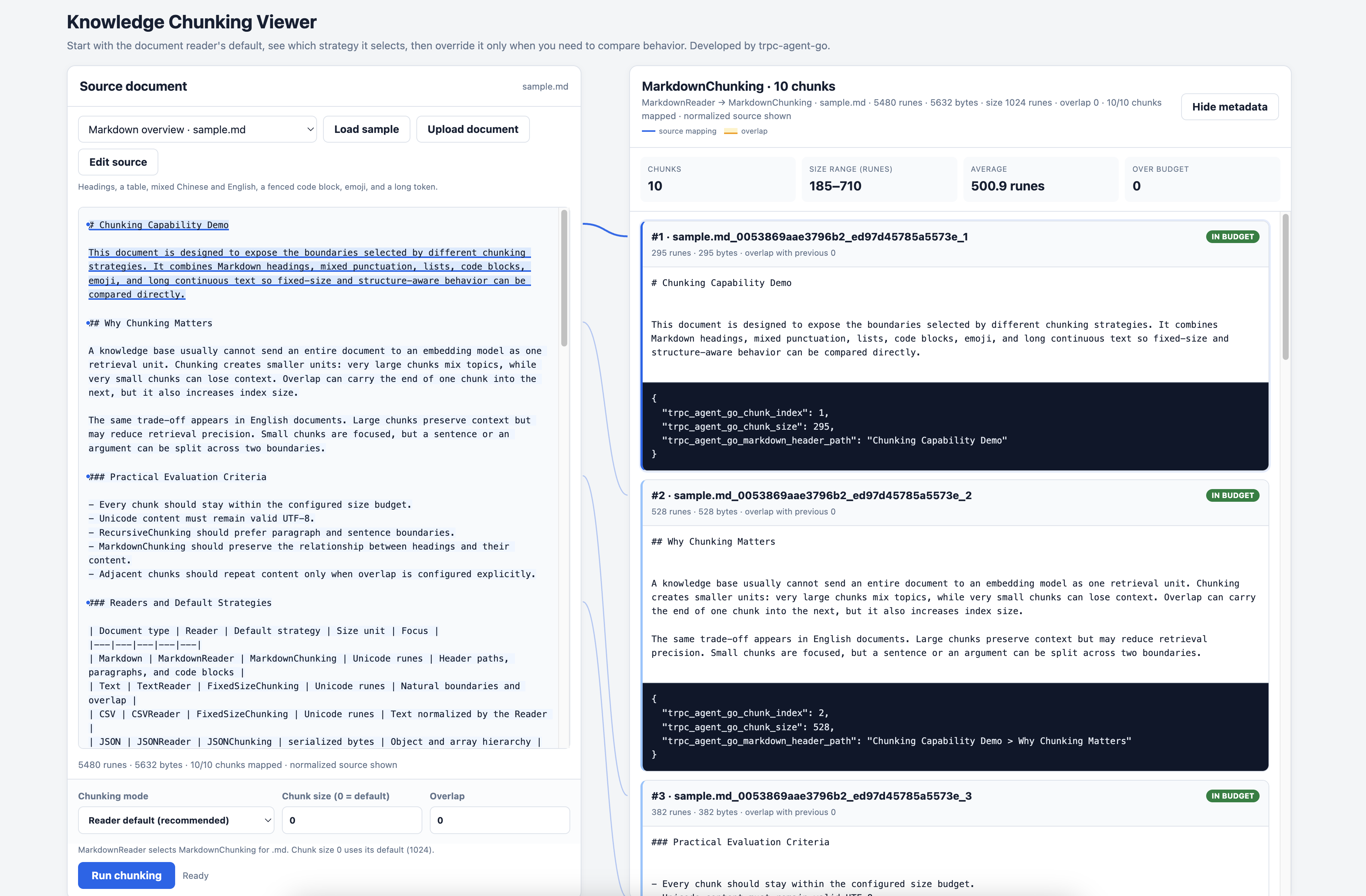
Example Code: interactive chunking viewer | fixed-chunking | recursive-chunking
Chunking is the process of splitting long documents into smaller fragments, which is crucial for vector retrieval. The framework provides multiple built-in chunking strategies and supports custom strategies.
Built-in Chunking Strategies
| Strategy | Description | Use Case |
|---|---|---|
| FixedSizeChunking | Size-bounded chunking with nearby natural boundaries | General text, simple and fast |
| RecursiveChunking | Recursive splitting and merging by separator hierarchy | Preserving semantic integrity |
| MarkdownChunking | Chunk by Markdown structure | Markdown documents (default) |
| JSONChunking | Chunk by JSON structure | JSON files (default) |
Default Behavior
Most applications configure a Source or Reader and do not need to construct a strategy directly. The Reader selects the default behavior:
| Document type | Default Reader behavior |
|---|---|
.md, .markdown |
MarkdownChunking (heading levels H1→H6→paragraph→natural text boundary) |
.json |
JSONChunking (JSON structure) |
.txt, .text |
FixedSizeChunking with natural text boundaries |
.csv |
Line-preserving FixedSizeChunking; a record is split only when it exceeds the active new-content budget |
.pdf, .doc, .docx |
The optional format Reader uses FixedSizeChunking when its package is imported |
.proto |
ProtoReader creates AST entity chunks |
.go, .py |
The optional language Reader creates AST entity chunks when imported; otherwise Source falls back to TextReader |
RecursiveChunking is available as an explicit custom strategy when separator-aware plain-text splitting is preferred.
PDF, DOCX, Go, and Python Readers are opt-in packages. Import the Reader package for the formats an application needs so it registers itself with the Reader registry.
Python AST entity signatures and class skeletons preserve positional-only (/),
variadic, and keyword-only (*) parameters, including their annotations and
default values.
Default Parameters:
| Parameter | Default | Description |
|---|---|---|
| ChunkSize | 1024 | Maximum Unicode runes for FixedSizeChunking, RecursiveChunking, and MarkdownChunking |
| JSON ChunkSize | 2000 | Maximum serialized bytes for JSONChunking |
| Overlap | 0 | Maximum overlapping Unicode runes between adjacent chunks |
overlaponly applies to FixedSizeChunking, RecursiveChunking, and MarkdownChunking. It is a maximum: the strategy may move the overlap start to a natural boundary or reduce it so the final chunk remains withinchunkSize. A large overlap leaves less room for new content and produces more chunks. JSONChunking does not support overlap.
Overlap is the content shared by the end of one chunk and the beginning of the next. It does not add separate overlap regions to both ends of a single chunk.
The implicit text-strategy overlap changed from 128 to 0. This affects
knowledge bases created without an explicit overlap: chunk boundaries and
embedding inputs will change. To keep an overlapping window, configure the
desired value explicitly with WithChunkOverlap or the strategy-specific
overlap option, then re-ingest the affected documents. Because overlap now
counts inside chunkSize, even an explicit value of 128 may not reproduce
the old over-budget chunks byte for byte.
FixedSizeChunking, RecursiveChunking, and MarkdownChunking preserve leading and
trailing spaces and tabs in source lines by default. This keeps indentation in
Python, YAML, Makefiles, nested Markdown, and fenced code intact. The strategies
still normalize text encoding and CRLF/CR line endings, and reject documents
that contain only whitespace. Every emitted chunk contains at least one
non-whitespace character and stays within chunkSize, including configured
overlap. Whitespace-only fragments are attached to adjacent semantic content
when the active chunk budget permits. Leading, trailing, or unusually long
whitespace that cannot be attached without producing an empty or oversized
chunk is discarded.
This is an intentional default behavior change. It changes chunk content, boundaries, metadata sizes, and embedding inputs compared with releases that trimmed every line. Clear and re-ingest persistent vector data after upgrading; do not mix chunks produced by the two behaviors. The opt-in compatibility mode remains available for applications that must retain the previous lossy normalization:
Pass the selected strategy through WithCustomChunkingStrategy. Each option
trims the document, every line, and retained chunk boundaries as earlier
releases did.
The text strategies validate their configuration when Chunk is called:
chunkSize must be greater than zero, and overlap must be in
[0, chunkSize). Invalid values return ErrInvalidChunkSize,
ErrInvalidOverlap, or ErrOverlapTooLarge instead of being adjusted
silently.
JSONChunking traverses object keys deterministically and array indices in numeric order. When a string value cannot fit together with its JSON path, it is split at UTF-8-safe boundaries. If an indivisible value plus its path cannot fit within the byte budget, chunking returns an error instead of emitting an over-budget chunk.
Adjust default strategy parameters via WithChunkSize and WithChunkOverlap:
Custom Chunking Strategy
Use WithCustomChunkingStrategy to override the default chunking strategy.
Note: Custom chunking strategy completely overrides
WithChunkSizeandWithChunkOverlapconfigurations. Chunking parameters must be set within the custom strategy.
FixedSizeChunking - Fixed Size Chunking
Splits text near the size limit, preferring a nearby line, sentence, punctuation, or word boundary, with optional overlap:
Use chunking.WithPreserveLines() when each input line is a logical record.
Complete lines are packed without splitting whenever they fit the active
new-content budget; an oversized line still falls back to sentence,
punctuation, whitespace, and UTF-8-safe rune boundaries. CSVReader enables this
option by default.
RecursiveChunking - Recursive Chunking
Recursively splits by separator hierarchy, preferring natural boundaries:
Separator Priority Explanation:
\n\n- First try to split by paragraph\n- Then split by line.- Then split by sentence- Split by space
Recursive chunking attempts to use higher priority separators, only using the next level separator when chunks still exceed the maximum size. If all separators fail to split text within chunkSize, it will force split by chunkSize.
For oversized logical blocks, the built-in text strategies rebalance a final piece smaller than half the chunk budget. Plain text prefers nearby natural boundaries; Markdown paragraphs prefer sentences and punctuation, while tables and fenced code blocks prefer complete lines. An unbroken token falls back to a UTF-8-safe rune boundary. Rebalancing does not cross Markdown heading scope or unrelated structured records, so a complete short section may remain a small chunk.
Configuring Metadata
To enable filter functionality, it's recommended to add rich metadata when creating document sources.
For detailed filter usage guide, please refer to Filter Documentation.
Content Transformer
Example Code: examples/knowledge/features/transform
Transformer is used to preprocess and postprocess content before and after document chunking. This is particularly useful for cleaning text extracted from PDFs, web pages, and other sources, removing excess whitespace, duplicate characters, and other noise.
Processing Flow
Built-in Transformers
CharFilter - Character Filter
Removes specified characters or strings:
CharDedup - Character Deduplicator
Merges consecutive duplicate characters or strings into a single instance:
Usage
Transformers are passed to various document sources via the WithTransformers option:
Combining Multiple Transformers
Multiple transformers are executed in sequence:
Typical Use Cases
| Scenario | Recommended Configuration |
|---|---|
| PDF text cleanup | CharDedup(" ", "\n") - Merge excess spaces and newlines from PDF extraction |
| Web content processing | CharFilter("\t") + CharDedup(" ") - Remove tabs and merge spaces |
| Code documentation processing | CharDedup("\n") - Merge excess blank lines, preserve code indentation |
| General text cleanup | CharFilter("\r") + CharDedup(" ", "\n") - Remove carriage returns and merge whitespace |
PDF File Support
Since the PDF reader depends on third-party libraries, to avoid introducing unnecessary dependencies in the main module, the PDF reader uses a separate go.mod.
To support PDF file reading, manually import the PDF reader package in your code:
Note: Readers for other formats (.txt/.md/.csv/.json, etc.) are automatically registered and don't need manual import.