Evaluation Guide
As model capabilities and tool ecosystems mature, Agent systems are moving from experimental scenarios to business-critical workflows. Release cadence keeps increasing, but delivery quality no longer depends on a single demo output. It depends on stability and regressibility under continuous evolution of models, prompts, tools, knowledge bases, and orchestration. During iterations, key behaviors can drift subtly, such as tool selection, parameter shapes, or output formats, making stable regression urgently needed.
Unlike deterministic systems, Agent issues often appear as probabilistic deviations. Reproduction and replay are difficult, and diagnosis must cross logs, traces, and external dependencies, which significantly increases the cost to close the loop.
The core purpose of evaluation is to turn key scenarios and acceptance criteria into assets and distill them into sustainable regression signals. tRPC-Agent-Go provides out-of-the-box evaluation capabilities, supporting asset management and result persistence based on evaluation sets and metrics. It includes static evaluators and LLM Judge evaluators, and provides multi-turn evaluation, repeated runs, Trace evaluation mode, callbacks, context injection, and concurrent inference to support local debugging and pipeline regression at engineering scale.
If you want to further automate prompt optimization on top of evaluation, continue with the PromptIter Guide. PromptIter is built on top of Evaluation and provides train/validation separation, multi-round optimization, asynchronous run management, and HTTP APIs.
Quick Start
This section provides a minimal example to help you quickly understand how to use tRPC-Agent-Go evaluation.
This example uses local file evaluation. The complete code is at examples/evaluation/local. The framework also provides an in-memory evaluation implementation. See examples/evaluation/inmemory for the full example.
Environment Setup
- Go 1.24+
- Accessible LLM model service
Configure the model service environment variables before running.
Local File Evaluation Example
This example uses local file evaluation. The complete code is at examples/evaluation/local.
Code Example
Two core code snippets are provided below, one for building the Agent and one for running the evaluation.
Agent Snippet
This snippet builds a minimal evaluable Agent. It mounts a function tool named calculator via llmagent and constrains math questions to tool calls through instruction, making tool traces stably aligned for evaluation.
Evaluation Snippet
This snippet creates a runnable Runner from the Agent, configures three local Managers to read the EvalSet and Metric and write result files, then creates an AgentEvaluator via evaluation.New and calls Evaluate for the specified evaluation set.
Evaluation Files
Evaluation files include the evaluation set file and evaluation metric file, organized as follows.
Evaluation Set File
The evaluation set file path is data/math-eval-app/math-basic.evalset.json, which holds evaluation cases. During inference, the system iterates evalCases and then uses userContent in each conversation turn as input.
The example below defines an evaluation set named math-basic. During evaluation, evalSetId selects the set to run, and evalCases contains the case list. This example has only one case calc_add. Inference creates a session from sessionInput and then runs each turn in conversation. Here there is only one turn calc_add-1, and the input comes from userContent, asking the Agent to handle calc add 2 3. This case uses the tool trajectory evaluator, so the expected tool trace is written in tools. It specifies that the Agent must call a tool named calculator with add and two operands, and the tool result must also match. Tool id is usually generated at runtime and is not used for matching.
Evaluation Metric File
The evaluation metric file path is data/math-eval-app/math-basic.metrics.json. It describes metrics, selects the evaluator via metricName, defines criteria via criterion, and sets thresholds via threshold. A file can configure multiple metrics, and the framework will run them in order.
This section configures only the tool trajectory evaluator tool_trajectory_avg_score. It compares tool traces per turn; tool id is usually generated at runtime and is not used for matching.
The metric compares tool calls per turn. If tool name, arguments, and result all match, the turn scores 1; otherwise 0. The overall score is the average across turns and is compared with threshold to decide pass or fail. When threshold is 1.0, every turn must match.
Run Evaluation
When running evaluation, the framework reads the evaluation set file and metric file, calls the Runner and captures responses and tool calls during inference, then scores according to metrics and writes result files.
View Evaluation Results
Results are written to output/math-eval-app/, with filenames like math-eval-app_math-basic_<uuid>.evalset_result.json.
The result file retains both actual and expected traces. As long as the tool trace meets the metric requirements, the evaluation result is marked as passed.
In-Memory Evaluation Example
inmemory maintains evaluation sets, metrics, and results in memory.
See examples/evaluation/inmemory for the complete example.
Code
Build EvalSet
Build Metric
Core Concepts
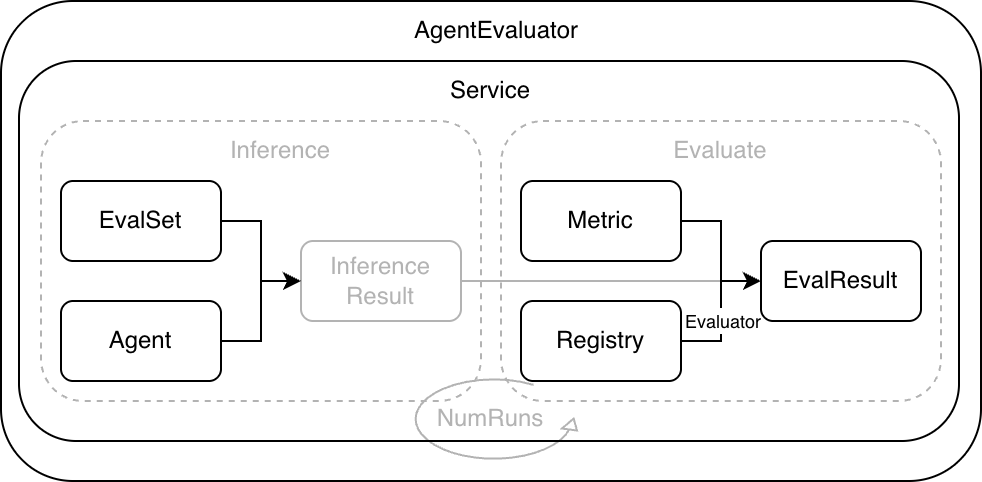
As shown below, the framework standardizes the Agent runtime through a unified evaluation workflow. Evaluation input consists of EvalSet and Metric. Evaluation output is EvalResult.

- EvalSet describes covered scenarios and provides evaluation input. Each case organizes Invocations per turn, including user input and expected
toolstraces orfinalResponsefor comparison. Expected traces can be written statically in EvalSet or pre-generated by ExpectedRunner during the inference phase of the standard evaluation flow. - Metric defines metric configuration and includes
metricName,criterion, andthreshold.metricNameselects the evaluator implementation,criteriondescribes evaluation criteria, andthresholddefines the threshold. - Evaluator reads actual and expected traces, computes
scorebased oncriterion, then compares withthresholdto determine pass or fail. - Registry maintains mappings between
metricNameand Evaluator. Built-in and custom evaluators integrate through it. - Service runs cases, collects traces, calls evaluators for scoring, and returns evaluation results.
- AgentEvaluator is created via
evaluation.Newwith Runner, Managers, Registry, and other dependencies, and exposesEvaluateto users.
A typical evaluation run includes the following steps.
- AgentEvaluator reads the EvalSet from EvalSetManager based on
evalSetIDand reads Metric config from MetricManager. - Service drives the Runner to execute each case and collects the actual Invocation list.
- Service fetches Evaluators from Registry for each Metric and computes scores.
- Service aggregates scores and statuses to produce evaluation results.
- AgentEvaluator persists results via EvalResultManager. Local mode writes to files, and in-memory mode keeps results in memory.
Usage
EvalSet
EvalSet describes the set of covered scenarios and provides evaluation input. Each scenario corresponds to an EvalCase, and EvalCase organizes Invocations per turn. Default mode supports two inference inputs: static conversation and dynamic conversationScenario. With conversation, the framework reads userContent turn by turn and drives Runner inference. With conversationScenario, the framework uses UserSimulator to generate the next user turn dynamically and collect actual traces. Expected traces come from conversation by default. When conversationScenario is used without expectedRunnerEnabled, the evaluation phase builds placeholder expecteds that keep only userContent from actual traces. When a case enables expectedRunnerEnabled, the framework pre-generates expecteds during inference through ExpectedRunner and reuses them directly during evaluation. In trace mode, inference is skipped and actualConversation is used as actual traces. During evaluation, Service passes actual and expected traces to Evaluator for comparison and scoring.
Structure Definition
EvalSet is a collection of evaluation cases. Each case is an EvalCase. In default mode, you can use Conversation to describe static multi-turn input, or ConversationScenario to describe dynamic user simulation. In trace mode, ActualConversation describes recorded actual traces. The structure definition is as follows.
EvalSet is identified by evalSetId and contains multiple EvalCases, each identified by evalId.
In default mode, inference can be organized in two ways. With conversation, the framework reads userContent turn by turn as input. With conversationScenario, the framework first creates the target Agent session and then uses UserSimulator to generate each user turn dynamically from the scenario. Both modes create the session with sessionInput.userId, can inject initial state through sessionInput.state, and inject additional context through contextMessages before each inference. In trace mode, inference is skipped and actualConversation is used directly as actual traces.
tools and finalResponse in EvalSet describe tool traces and final responses. Whether they are needed depends on the selected evaluation metrics.
In trace mode, you can configure actual output traces explicitly via actualConversation.
If both conversation and actualConversation are provided in trace mode, they must be aligned by turn, and each turn in actualConversation should include userContent. If only actualConversation is provided and conversation is omitted, it means no static expected outputs are provided. If the case enables expectedRunnerEnabled and an ExpectedRunner is injected, the standard evaluation flow will pre-generate expected outputs during inference.
When evalMode is empty, it is the default mode. In this mode, you must configure exactly one of conversation or conversationScenario. When evalMode is trace, inference is skipped and actualConversation is used as actual traces for evaluation. conversation can be provided optionally as expected outputs, while conversationScenario is not supported in trace mode.
EvalSet Manager
EvalSetManager is the storage abstraction for EvalSet, separating evaluation assets from code. By switching implementations, you can use local file or in-memory storage, or implement the interface to connect to a database or configuration platform.
Interface Definition
The EvalSetManager interface is defined as follows.
If you want to read EvalSet from a database, object storage, or configuration platform, you can implement this interface and inject it when creating AgentEvaluator.
InMemory Implementation
The framework provides an in-memory implementation of EvalSetManager, suitable for dynamically building or temporarily maintaining evaluation sets in code. It is concurrency-safe with read/write locking. To prevent accidental mutation, the read interface returns deep copies.
Local Implementation
The framework provides a local file implementation of EvalSetManager, suitable for keeping EvalSet as versioned assets.
It is concurrency-safe with read/write locking. It writes to a temporary file and renames it on success to reduce file corruption risk. Local implementation uses BaseDir as the root directory and Locator to manage path rules. Locator maps evalSetId to file paths and lists existing evaluation sets under an appName. The default naming rule for evaluation set files is <BaseDir>/<AppName>/<EvalSetId>.evalset.json.
If you want to reuse an existing directory structure, you can customize Locator and inject it when creating EvalSetManager.
MySQL Implementation
The MySQL implementation of EvalSetManager persists EvalSet and EvalCase to MySQL.
It stores evaluation sets and evaluation cases in two tables, and returns cases in insertion order when reading an evaluation set.
Configuration Options
Connection:
WithMySQLClientDSN(dsn string): Connect using DSN directly (recommended). Consider enablingparseTime=true.WithMySQLInstance(instanceName string): Use a registered MySQL instance. You must register it viastorage/mysql.RegisterMySQLInstancebefore use. Note:WithMySQLClientDSNhas higher priority; if both are set, DSN wins.WithExtraOptions(extraOptions ...any): Extra options passed to the MySQL client builder. Note: When usingWithMySQLInstance, the registered instance configuration takes precedence and this option will not take effect.
Tables:
WithTablePrefix(prefix string): Table name prefix. An empty prefix means no prefix. A non-empty prefix must start with a letter or underscore and contain only letters/numbers/underscores.trpcandtrpc_are equivalent; an underscore separator is added automatically.
Initialization:
WithSkipDBInit(skip bool): Skip automatic table creation. Default isfalse.WithInitTimeout(timeout time.Duration): Automatic table creation timeout. Default is30s.
Code Example
Configuration Reuse
Storage Layout
When skipDBInit=false, the manager creates required tables during initialization. The default value is false. If skipDBInit=true, you need to create tables yourself. You can use the SQL below, which is identical to evaluation/evalset/mysql/schema.sql. Replace {{PREFIX}} with the actual table prefix, e.g. trpc_. If you don't use a prefix, replace it with an empty string.
EvalMetric
EvalMetric defines evaluation metrics. It selects an evaluator implementation by metricName, describes criteria with criterion, and defines thresholds with threshold. A single evaluation can configure multiple metrics. The evaluation run applies them in order and produces scores and statuses for each.
Structure Definition
The EvalMetric structure is defined as follows.
metricName selects the evaluator implementation from Registry. The following evaluators are built in by default:
tool_trajectory_avg_score: tool trajectory consistency evaluator, requires expected output.final_response_avg_score: final response evaluator, does not require LLM, requires expected output.llm_final_response: LLM final response evaluator, requires expected output.llm_hallucinations: LLM hallucination evaluator, checks whether the final answer is supported by evidence captured during execution, and typically does not require expected output.llm_rubric_critic: LLM rubric critic evaluator, requires expected output plus LLMJudge rubrics.llm_rubric_reference_critic: LLM rubric reference critic evaluator, requires expected output plus LLMJudge rubrics, and uses the reference answer as a quality anchor instead of an exact-match golden target.llm_rubric_response: LLM rubric response evaluator, requires EvalSet to provide session input and LLMJudge plus rubrics.llm_rubric_knowledge_recall: LLM rubric knowledge recall evaluator, requires EvalSet to provide session input and LLMJudge plus rubrics.
threshold defines the threshold. Evaluators output a score and determine pass or fail based on it. The definition of score varies slightly across evaluators, but a common approach is to compute scores per Invocation and aggregate them into an overall score. Under the same EvalSet, metricName must be unique. The order of metrics in the file also affects the evaluation execution order and result display order.
Below is an example metric file for tool trajectory.
Criterion
Criterion describes evaluation criteria. Each evaluator reads only the sub-criteria it cares about, and you can combine them as needed.
The framework includes the following criterion types:
| Criterion Type | Applies To |
|---|---|
| TextCriterion | Text strings |
| JSONCriterion | JSON objects |
| RougeCriterion | ROUGE text scoring |
| ToolTrajectoryCriterion | Tool call trajectories |
| FinalResponseCriterion | Final response content |
| LLMCriterion | LLM-based evaluation models |
| Criterion | Aggregation of multiple criteria |
TextCriterion
TextCriterion compares two strings, commonly used for tool name comparison and final response text comparison. The structure is defined as follows.
TextMatchStrategy supports exact, contains, and regex, with a default of exact. During comparison, source is the actual string and target is the expected string. exact requires equality, contains requires source to contain target, and regex treats target as a regular expression and matches source.
| TextMatchStrategy Value | Description |
|---|---|
| exact | Actual equals expected exactly (default). |
| contains | Actual contains expected. |
| regex | Actual matches expected as a regular expression. |
Example configuration snippet uses regex matching and case-insensitive mode.
TextCriterion provides a Compare extension to override default comparison logic.
The following snippet uses Compare to trim spaces before comparison.
JSONCriterion
JSONCriterion compares two JSON values, commonly used for tool arguments and tool results. The structure is defined as follows.
Currently, matchStrategy only supports exact, with default exact.
During comparison, actual is the actual value and expected is the expected value. Object comparison requires identical key sets. Array comparison requires identical length and order. Numeric comparison supports a tolerance, default 1e-6. ignoreTree ignores unstable fields; a leaf node set to true ignores that field and its subtree. onlyTree compares only selected fields; keys not present in the tree are ignored. A leaf node set to true compares that field and its subtree. onlyTree and ignoreTree cannot be set at the same time when both are non-empty.
Example configuration ignores id and metadata.timestamp, and relaxes numeric tolerance.
Example configuration compares only name and metadata.id, and ignores all other fields.
JSONCriterion provides a Compare extension to override default comparison logic.
The following snippet defines custom matching logic: if both actual and expected contain key common, it matches.
RougeCriterion
RougeCriterion scores two strings using ROUGE and treats the pair as a match when the scores meet the configured thresholds.
See examples/evaluation/rouge for a complete example.
RougeType supports rougeN, rougeL, and rougeLsum, where N is a positive integer. For example: rouge1, rouge2, rouge3, rougeL, rougeLsum.
Measure supports f1, precision, and recall, with a default of f1 when unset.
Threshold defines minimum requirements. Precision, recall, and f1 all participate in the pass check. Unset fields default to 0. ROUGE scores are in range [0, 1].
UseStemmer enables Porter stemming for the built-in tokenizer. When Tokenizer is set, UseStemmer is ignored.
SplitSummaries controls sentence splitting for rougeLsum only.
Tokenizer injects a custom tokenizer.
The following snippet configures FinalResponseCriterion to match by rougeLsum with thresholds.
Example metric JSON config:
MetricRegistry Extensions
When evaluation metrics come from local files or a database, runtime objects such as compare and tokenizer cannot be written directly into JSON. In this case, you can write the implementation name in the config file, and then register and resolve the actual implementation in code through evaluation.WithMetricRegistry(...).
This mechanism applies to the following cases:
text.compareNamejson.compareNametoolTrajectory.compareNamefinalResponse.compareNamerouge.tokenizerName
If you use a local file manager, you can declare tokenizerName in the metric file like this:
Then register a tokenizer named jieba in code and inject it through evaluation.WithMetricRegistry(...):
During evaluation, the framework first reads metric configs from metricManager, and then resolves the actual implementation from MetricRegistry according to tokenizerName or compareName.
For a complete example, see examples/evaluation/jieba.
ToolTrajectoryCriterion
ToolTrajectoryCriterion compares tool trajectories per turn by comparing tool call lists. The structure is defined as follows.
Tool trajectory comparison only looks at tool name, arguments, and result by default, and does not compare tool id.
orderSensitive defaults to false, which uses unordered matching. Internally, the framework treats expected tool calls as left nodes and actual tool calls as right nodes. If an expected tool and actual tool satisfy the matching strategy, an edge is created between them. The framework then uses the Kuhn algorithm to solve maximum bipartite matching and obtains a set of one-to-one pairs. If all expected tools can be matched without conflict, it passes. Otherwise, it returns the expected tools that cannot be matched.
subsetMatching defaults to false and requires the number of actual tools to match the number of expected tools. When enabled, actual traces may contain extra tool calls, which suits scenarios with unstable tool counts but still need to constrain key calls.
defaultStrategy defines the default matching strategy at the tool level. toolStrategy allows overrides by tool name. If no override matches, it falls back to the default. Each strategy can configure name, arguments, and result, and you can skip comparison by setting ignore to true for a sub-criterion.
The following configuration example uses the tool trajectory evaluator and configures ToolTrajectoryCriterion. Tool name and arguments use strict matching. For calculator, it ignores trace_id in arguments and relaxes numeric tolerance for results. For current_time, it ignores result to avoid matching instability from dynamic timestamps.
ToolTrajectoryCriterion provides a Compare extension to override default comparison logic.
The following snippet uses Compare to treat expected tool list as a blacklist. It matches when none of the expected tool names appear in the actual tools.
Assuming A, B, C, and D are tool calls, matching examples are as follows:
| SubsetMatching | OrderSensitive | Expected Sequence | Actual Sequence | Result | Description |
|---|---|---|---|---|---|
| Off | Off | [A] |
[A, B] |
Mismatch | Different counts. |
| On | Off | [A] |
[A, B] |
Match | Expected is a subset. |
| On | Off | [C, A] |
[A, B, C] |
Match | Subset and unordered match. |
| On | On | [A, C] |
[A, B, C] |
Match | Subset and ordered match. |
| On | On | [C, A] |
[A, B, C] |
Mismatch | Order mismatch. |
| On | Off | [C, D] |
[A, B, C] |
Mismatch | Actual is missing D. |
| Any | Any | [A, A] |
[A] |
Mismatch | Insufficient actual calls; one call cannot match twice. |
FinalResponseCriterion
FinalResponseCriterion compares final responses per turn. It supports text comparison, JSON structural comparison after parsing content, and ROUGE scoring. The structure is defined as follows.
When using this criterion, you need to fill finalResponse on the expected side for the corresponding turn in EvalSet.
text, json, and rouge can be configured together, and all configured sub-criteria must match. When json is configured, the content must be parseable as JSON.
To match by ROUGE, configure rouge and see RougeCriterion for details.
The following example selects final_response_avg_score and configures FinalResponseCriterion to compare final responses by text containment.
FinalResponseCriterion provides a Compare extension to override default comparison logic.
The following snippet uses Compare to treat the expected final response as a blacklist. If the actual final response equals it, it is considered a mismatch. This is suitable for forbidding fixed templates.
LLMCriterion
LLMCriterion configures LLM Judge evaluators. It is suitable for evaluating semantic quality and compliance that are hard to cover with deterministic rules. It selects the judge model and sampling strategy via judgeModel, and uses rubrics to provide evaluation criteria. The structure is defined as follows.
judgeModel supports environment variable references in providerName, modelName, variant, baseURL, and apiKey, which are expanded at runtime. For security, avoid writing judgeModel.apiKey or judgeModel.baseURL in plain text in metric configuration files or code.
variant is optional and selects the OpenAI-compatible variant, for example openai, hunyuan, deepseek, qwen. It is only effective when providerName is openai. When omitted, the default variant is openai.
Generation defaults to MaxTokens=2000, Temperature=0.8, Stream=false.
numSamples controls the number of samples per turn. The default is 1. More samples reduce judge variance but increase cost.
providerName indicates the judge model provider, which maps to the framework Model Provider. The framework creates a judge model instance based on providerName and modelName. Common values include openai, anthropic, and gemini. See Provider for details.
rubrics split a metric into multiple clear-granularity criteria. Each rubric should be independent and directly verifiable from user input and the final answer, which improves judge stability and makes issues easier to locate. id is a stable identifier, and content.text is the rubric text used by the judge.
Below is an example metric configuration that selects llm_rubric_response and configures a judge model with two rubrics.
Metric Manager
MetricManager is the storage abstraction for Metric, separating metric configuration from code. By switching implementations, you can use local file or in-memory storage, or implement the interface to connect to a database or configuration platform.
Interface Definition
The MetricManager interface is defined as follows.
If you want to read Metric from a database, object storage, or configuration platform, you can implement this interface and inject it when creating AgentEvaluator.
InMemory Implementation
The framework provides an in-memory implementation of MetricManager, suitable for dynamically building or temporarily maintaining metric configuration in code. It is concurrency-safe with read/write locking. To prevent accidental mutation, the read interface returns deep copies, and the write interface copies input objects before writing.
Local Implementation
The framework provides a local file implementation of MetricManager, suitable for keeping Metric as versioned evaluation assets.
It is concurrency-safe with read/write locking. It writes to a temporary file and renames it on success to reduce file corruption risk. In local mode, the default metric file naming rule is <BaseDir>/<AppName>/<EvalSetId>.metrics.json, and you can customize the path rule via Locator.
MySQL Implementation
The MySQL implementation of MetricManager persists metric configuration to MySQL.
Configuration Options
Connection:
WithMySQLClientDSN(dsn string): Connect using DSN directly (recommended). Consider enablingparseTime=true.WithMySQLInstance(instanceName string): Use a registered MySQL instance. You must register it viastorage/mysql.RegisterMySQLInstancebefore use. Note:WithMySQLClientDSNhas higher priority; if both are set, DSN wins.WithExtraOptions(extraOptions ...any): Extra options passed to the MySQL client builder. Note: When usingWithMySQLInstance, the registered instance configuration takes precedence and this option will not take effect.
Tables:
WithTablePrefix(prefix string): Table name prefix. An empty prefix means no prefix. A non-empty prefix must start with a letter or underscore and contain only letters/numbers/underscores.trpcandtrpc_are equivalent; an underscore separator is added automatically.
Initialization:
WithSkipDBInit(skip bool): Skip automatic table creation. Default isfalse.WithInitTimeout(timeout time.Duration): Automatic table creation timeout. Default is30s, consistent with components such as memory/mysql.
Code Example
Configuration Reuse
Storage Layout
When skipDBInit=false, the manager creates required tables during initialization. The default value is false. If skipDBInit=true, you need to create tables yourself. You can use the SQL below, which is identical to evaluation/metric/mysql/schema.sql. Replace {{PREFIX}} with the actual table prefix, e.g. trpc_. If you don't use a prefix, replace it with an empty string.
Evaluator
Evaluator is the evaluation interface that implements the scoring logic for a single metric. During evaluation, the Evaluator corresponding to metricName is fetched from Registry, receives actual and expected traces, and returns a score and status.
Interface Definition
Evaluator interface is defined as follows.
Evaluator input is two Invocation lists. actuals are the actual traces collected during inference, and expecteds are expected traces from EvalSet. The framework calls Evaluate per EvalCase, and actuals and expecteds represent the actual and expected traces for the case and are aligned by turn. Most evaluators require both lists to have the same number of turns, otherwise an error is returned.
Evaluator output includes overall results and per-turn details. Overall score is usually aggregated from per-turn scores, and overall status is usually determined by comparing overall score with threshold. For deterministic evaluators, reason usually records mismatch reasons. For LLM Judge evaluators, reason and rubricScores preserve judge rationale.
Tool Trajectory Evaluator
The built-in tool trajectory evaluator is named tool_trajectory_avg_score, and its criterion is criterion.toolTrajectory. It compares tool name, arguments, and result per turn.
The default implementation uses binary scoring: a fully matched turn scores 1, otherwise 0. The overall score is the average across turns, then compared with threshold to determine pass or fail.
Example tool trajectory metric configuration:
See examples/evaluation/tooltrajectory for the full example.
Final Response Evaluator
The built-in final response evaluator is named final_response_avg_score, and its criterion is finalResponse. It compares finalResponse per turn.
This evaluator uses binary scoring and aggregates the overall score by averaging per-turn scores. If you want to compare final answers by conclusions or key fields, adjust matching strategy via text and json in FinalResponseCriterion first, then consider using the Compare extension to override comparison logic.
LLM Judge Evaluators
LLM Judge evaluators use a judge model to score semantic output quality, suitable for scenarios such as correctness, completeness, and compliance that are hard to cover with deterministic rules. They select the judge model via criterion.llmJudge.judgeModel and support numSamples to sample multiple times per turn to reduce judge variance.
The internal flow can be understood as follows.
messagesconstructorbuilds judge input based on the current turn and history ofactualsandexpecteds.- Calls the judge model
numSamplestimes to sample. responsescorerextracts scores and explanations from judge output and generates sample results.samplesaggregatoraggregates sample results into the turn result.invocationsaggregatoraggregates multi-turn results into overall score and status.
To allow different metrics to reuse the same orchestration while swapping individual steps, the framework abstracts these steps as operator interfaces and composes them via LLMEvaluator.
The framework includes the following LLM Judge evaluators:
llm_final_responsefocuses on consistency between the final answer and reference answer, typically requiringfinalResponseon the expected side.llm_hallucinationschecks whether the final answer is supported by evidence collected during execution, and is well suited to tool-calling, RAG, and workflow scenarios.llm_rubric_criticfocuses on a failure-oriented rubric review against the reference answer, requiringfinalResponseon the expected side pluscriterion.llmJudge.rubrics.llm_rubric_reference_criticfocuses on rubric-based review against a reference answer while allowing faithful paraphrases and non-identical wording, requiringfinalResponseon the expected side pluscriterion.llmJudge.rubrics.llm_rubric_responsefocuses on whether the final answer satisfies evaluation rubrics, requirescriterion.llmJudge.rubrics, and aggregates scores by rubric pass status.llm_rubric_knowledge_recallfocuses on whether tool retrieval results support rubrics, typically requiring knowledge retrieval tool calls in the actual trace and extracting retrieval content as judge input.
Interface Definition
LLM Judge evaluators implement the LLMEvaluator interface, which extends evaluator.Evaluator and composes four operator interfaces.
Messages Constructor Operator
messagesconstructor assembles the current turn context into judge-ready input. Different evaluators choose different comparison targets. Common combinations include user input, final answer, reference final answer, and rubrics.
Interface definition:
The framework includes multiple MessagesConstructor implementations for different built-in evaluators. Default selection is as follows:
messagesconstructor/finalresponseforllm_final_response, organizing user input, actual final response, and expected final response as judge input.messagesconstructor/hallucinationforllm_hallucinations, splitting the actual final answer into sentence-level or bullet-level items and combining them with captured execution context, tool calls, and tool outputs.messagesconstructor/rubriccriticforllm_rubric_critic, organizing user input, actual final response, expected final response, andrubricsas judge input, with stricter failure-oriented instructions.messagesconstructor/rubricreferencecriticforllm_rubric_reference_critic, organizing user input, actual final response, expected final response, andrubricsas judge input, and treating the reference answer as a quality anchor rather than an exact-match target.messagesconstructor/rubricresponseforllm_rubric_response, organizing user input, actual final response, andrubricsas judge input.messagesconstructor/rubricknowledgerecallforllm_rubric_knowledge_recall, extracting knowledge retrieval tool outputs from actual traces as judge evidence, and combining with user input andrubricsas judge input.
Response Scorer Operator
responsescorer parses judge model output and extracts scores. LLM Judge evaluators usually normalize scores to 0-1 and write judge explanations to reason. Rubric evaluators also return rubricScores for each rubric.
Interface definition:
The framework includes multiple ResponseScorer implementations. Default selection is as follows:
responsescorer/finalresponseforllm_final_response, parsingvalidorinvalidfrom judge output and mapping to 1 or 0, while preservingreasoningasreason.responsescorer/hallucinationforllm_hallucinations, parsing sentence-level judgments, scoring supported or non-factual sentences as 1 and the rest as 0, and averaging across sentences for the turn score.responsescorer/rubricresponseforllm_rubric_critic,llm_rubric_reference_critic,llm_rubric_response, andllm_rubric_knowledge_recall, parsing verdictyesornofor each rubric, mapping each to 1 or 0, averaging as the turn score, and outputtingrubricScores.
Samples Aggregator Operator
samplesaggregator aggregates numSamples judge samples. The default implementation uses majority vote to select the representative sample, and chooses a failure sample on ties to remain conservative.
Interface definition:
The framework includes samplesaggregator/majorityvote, which is the default for built-in evaluators. It splits samples by threshold into pass and fail, chooses the majority side as the representative, and chooses failure on ties.
Invocations Aggregator Operator
invocationsaggregator aggregates multi-turn results into the overall score. The default implementation averages scores of evaluated turns and skips turns with status not_evaluated.
Interface definition:
The framework includes invocationsaggregator/average, which is the default for built-in evaluators. It averages scores of evaluated turns and determines overall status based on threshold.
Judge Runner
By default, LLM Judge evaluators call the judge model directly via criterion.llmJudge.judgeModel. You can also inject a judge runner with evaluation.WithJudgeRunner, and use the runner's final *model.Response instead of a direct model call.
When enabled, judgeModel is ignored. Each invocation calls the judge runner once.
Example snippet:
Custom Composition
LLM Judge evaluators support injecting different operator implementations via Option to adjust evaluation logic without modifying the evaluator itself. The example below replaces the sample aggregation strategy with a minimum strategy, which fails if any sample fails.
LLM Final Response Evaluator
The LLM final response evaluator has the metric name llm_final_response and is an LLM Judge evaluator. It uses LLMCriterion to configure the judge model and makes semantic judgments on the final answer. By default, it organizes user input, expected final response, and actual final response into judge input, suitable for automated validation of final text output.
The evaluator calls the judge model via criterion.llmJudge.judgeModel and samples multiple times per turn based on numSamples. The judge model must return the field is_the_agent_response_valid with value valid or invalid (case-insensitive). valid scores 1, invalid scores 0. Other results or parsing failures cause errors. With multiple samples, a majority vote selects the representative sample for the turn, then compares with threshold to determine pass or fail.
llm_final_response usually requires finalResponse on the expected side as the reference answer. If the task has multiple equivalent correct formulations, you can write a more abstract reference answer or use llm_rubric_response to reduce judge misclassification. For security, avoid writing judgeModel.apiKey and judgeModel.baseURL in plain text, and use environment variables instead.
Example metric configuration for LLM final response:
See examples/evaluation/llm/finalresponse for the full example.
LLM Hallucination Evaluator
The LLM hallucination evaluator uses the metric name llm_hallucinations. It checks whether statements in the final answer are supported by evidence collected during the run. Unlike llm_final_response, llm_rubric_critic, or llm_rubric_reference_critic, it usually does not rely on an expected finalResponse. Instead, it looks directly at the evidence in the actual trace, such as context, tool calls, and tool outputs. This makes it a good fit for tool-calling, RAG, and workflow scenarios where you want to detect answers that drift away from available evidence.
During evaluation, the framework first splits the final answer into sentences or bullet items, then compares each item against the captured evidence. Sentences that are supported by evidence score 1. Sentences that are contradicted, unsupported, or disputed score 0. Content that does not need factual grounding, such as greetings or filler text, also scores 1. The turn score is the average across all items.
This metric does not require a reference answer on the expected side, but it does require usable evidence in the actual trace. If the trace contains only the final answer and lacks tool outputs, context messages, or other grounding signals, the result will usually be conservative and more likely to be judged as unsupported.
Example metric configuration using judgeModel:
If you inject a judge runner with evaluation.WithJudgeRunner(...), you can keep llmJudge as an empty object in the metric file, as shown in the full example. See examples/evaluation/llm/hallucination for a complete runnable example. That example includes both a normal passing path and a -force-hallucination failing path for local validation.
LLM Rubric Critic Evaluator
The LLM rubric critic evaluator has the metric name llm_rubric_critic and is an LLM Judge evaluator. It combines the strengths of reference-based checking and rubric-based decomposition: it compares the agent final answer against the reference final answer, but still scores per rubric item. This makes it suitable for scenarios where you want the judge to behave like a strict reviewer, explicitly look for defects, and fail on ambiguity, incompleteness, or unsupported claims.
The evaluator constructs judge input from user input, actual final response, expected final response, and criterion.llmJudge.rubrics. The default prompt instructs the judge to adopt a skeptical, failure-oriented stance, treat the reference answer as authoritative, and return no whenever fulfillment is missing, partial, ambiguous, or unverifiable. The judge returns yes or no for each rubric. A single sample score is the average across rubrics, and with multiple samples the evaluator uses majority vote before comparing with threshold.
Use llm_rubric_critic when plain llm_final_response is too coarse-grained, but llm_rubric_response is too permissive because it does not compare against a reference answer. Rubrics should remain atomic and directly checkable. Because this evaluator depends on a reference answer, it usually requires finalResponse on the expected side. For security, avoid writing judgeModel.apiKey and judgeModel.baseURL in plain text, and use environment variables instead.
Example metric configuration for LLM rubric critic:
LLM Rubric Reference Critic Evaluator
The LLM rubric reference critic evaluator has the metric name llm_rubric_reference_critic and is an LLM Judge evaluator. It also compares the agent final answer against a reference final answer and scores by rubric item, but it is less failure-oriented than llm_rubric_critic. The reference answer serves as a quality anchor that defines the target level of grounding, specificity, and completeness, while still allowing faithful paraphrases and different sentence structure.
The evaluator constructs judge input from user input, actual final response, expected final response, and criterion.llmJudge.rubrics. The default prompt tells the judge to preserve the same decisive facts, level of useful detail, and overall fidelity demonstrated by the reference answer, while avoiding exact-match bias. The judge returns yes or no for each rubric. A single sample score is the average across rubrics, and with multiple samples the evaluator uses majority vote before comparing with threshold.
Use llm_rubric_reference_critic when llm_final_response is too coarse-grained, llm_rubric_response is too permissive because it ignores the reference answer, and llm_rubric_critic is too strict because it treats the reference as an authoritative golden answer. Rubrics should still remain atomic and directly checkable. Because this evaluator depends on a reference answer, it usually requires finalResponse on the expected side. For security, avoid writing judgeModel.apiKey and judgeModel.baseURL in plain text, and use environment variables instead.
Example metric configuration for LLM rubric reference critic:
LLM Rubric Response Evaluator
The LLM rubric response evaluator has the metric name llm_rubric_response and is an LLM Judge evaluator. It uses LLMCriterion to configure the judge model and splits a metric into multiple independent rubrics via rubrics. It focuses on whether the final answer satisfies each rubric, suitable for automated evaluation of correctness, relevance, compliance, and other goals that are hard to cover with deterministic rules.
The evaluator constructs judge input based on criterion.llmJudge.rubrics, and the judge model returns yes or no for each rubric. The score for one sample is the average across rubrics, where yes is 1 and no is 0. When numSamples is configured, it uses samplesaggregator/majorityvote to select the representative result and then compares with threshold to determine pass or fail.
Rubrics should be concrete and directly verifiable from user input and the final answer. Avoid combining multiple requirements into one rubric to reduce judge variance and make issues easier to locate. For security, avoid writing judgeModel.apiKey and judgeModel.baseURL in plain text, and use environment variables instead.
Example metric configuration for LLM rubric response:
See examples/evaluation/llm/rubricresponse for the full example.
LLM Rubric Knowledge Recall Evaluator
The LLM rubric knowledge recall evaluator has the metric name llm_rubric_knowledge_recall and is an LLM Judge evaluator. It uses LLMCriterion to configure the judge model and describes key information that retrieved evidence must support via rubrics. This evaluator focuses on whether retrieved knowledge is sufficient to support the user's question or key facts in rubrics, and is suitable for automated recall quality evaluation in RAG scenarios.
The evaluator extracts responses from knowledge retrieval tools such as knowledge_search and knowledge_search_with_agentic_filter as evidence, and constructs judge input together with criterion.llmJudge.rubrics. The judge model returns yes or no for each rubric. A single sample score is the average. With multiple samples, it uses majority vote to select the representative result, then compares with threshold to determine pass or fail.
This evaluator requires knowledge retrieval tool calls in actual traces that return usable retrieval results, otherwise it cannot form stable judge input. Rubrics should focus on whether evidence contains and supports key facts, and avoid mixing final answer quality requirements into recall evaluation. For security, avoid writing judgeModel.apiKey and judgeModel.baseURL in plain text, and use environment variables instead.
Example metric configuration for LLM rubric knowledge recall:
See examples/evaluation/llm/knowledgerecall for the full example.
Evaluator Registry
Registry manages evaluator registrations. Evaluation uses metricName to fetch the corresponding Evaluator from Registry. The framework registers the following evaluators by default:
tool_trajectory_avg_score: tool trajectory consistency evaluator, requires expected output.final_response_avg_score: final response evaluator, does not require LLM, requires expected output.llm_final_response: LLM final response evaluator, requires expected output.llm_hallucinations: LLM hallucination evaluator, checks whether the final answer is supported by evidence captured during execution, and typically does not require expected output.llm_rubric_critic: LLM rubric critic evaluator, requires expected output and LLMJudge with rubrics.llm_rubric_reference_critic: LLM rubric reference critic evaluator, requires expected output and LLMJudge with rubrics, and treats the reference answer as a quality anchor.llm_rubric_response: LLM rubric response evaluator, requires EvalSet to provide session input and LLMJudge with rubrics.llm_rubric_knowledge_recall: LLM rubric knowledge recall evaluator, requires EvalSet to provide session input and LLMJudge with rubrics.
You can register custom evaluators and inject a custom Registry when creating AgentEvaluator.
EvalResult
EvalResult holds evaluation output. One evaluation run produces an EvalSetResult, organizes results by EvalCase, and records each metric's score, status, and per-turn details.
Structure Definition
The EvalSetResult structure is defined as follows.
Overall results write each metric output into overallEvalMetricResults. Per-turn details are written into evalMetricResultPerInvocation and retain both actualInvocation and expectedInvocation traces for troubleshooting.
Below is an example result file snippet.
EvalResult Manager
EvalResultManager is the storage abstraction for EvalResult. It decouples evaluation result persistence and retrieval from evaluation execution. By switching implementations, you can use local file or in-memory storage, or implement the interface to connect to object storage, databases, or configuration platforms.
Interface Definition
The EvalResultManager interface is defined as follows.
If you want to write results to object storage or a database, implement this interface and inject it when creating AgentEvaluator.
InMemory Implementation
The framework provides an in-memory implementation of EvalResultManager, suitable for temporarily storing evaluation results in debugging or interactive scenarios. It is concurrency-safe, and the read interface returns deep copies.
Local Implementation
The framework provides a local file implementation of EvalResultManager, suitable for storing evaluation results as files in local or artifact directories.
It is concurrency-safe. It writes to a temporary file and renames it on success to reduce file corruption risk. When evalSetResultId is not provided on Save, the implementation generates a result ID and fills in evalSetResultName and creationTimestamp. The default naming rule is <BaseDir>/<AppName>/<EvalSetResultId>.evalset_result.json, and you can customize the path rule via Locator.
MySQL Implementation
The MySQL implementation of EvalResultManager persists evaluation results to MySQL.
Configuration Options
Connection:
WithMySQLClientDSN(dsn string): Connect using DSN directly (recommended). Consider enablingparseTime=true.WithMySQLInstance(instanceName string): Use a registered MySQL instance. You must register it viastorage/mysql.RegisterMySQLInstancebefore use. Note:WithMySQLClientDSNhas higher priority; if both are set, DSN wins.WithExtraOptions(extraOptions ...any): Extra options passed to the MySQL client builder. Note: When usingWithMySQLInstance, the registered instance configuration takes precedence and this option will not take effect.
Tables:
WithTablePrefix(prefix string): Table name prefix. An empty prefix means no prefix. A non-empty prefix must start with a letter or underscore and contain only letters/numbers/underscores.trpcandtrpc_are equivalent; an underscore separator is added automatically.
Initialization:
WithSkipDBInit(skip bool): Skip automatic table creation. Default isfalse.WithInitTimeout(timeout time.Duration): Automatic table creation timeout. Default is30s, consistent with components such as memory/mysql.
Code Example
Configuration Reuse
Storage Layout
When skipDBInit=false, the manager creates required tables during initialization. The default value is false. If skipDBInit=true, you need to create tables yourself. You can use the SQL below, which is identical to evaluation/evalresult/mysql/schema.sql. Replace {{PREFIX}} with the actual table prefix, e.g. trpc_. If you don't use a prefix, replace it with an empty string.
Evaluation Service
Service is the evaluation execution entry. It splits an evaluation into inference and evaluation phases. Inference runs the Agent and collects actual traces. Evaluation scores actual and expected traces based on metrics and passes results to EvalResultManager for persistence.
Interface Definition
Service interface is defined as follows.
The framework provides a local Service implementation that depends on Runner for inference, EvalSetManager for EvalSet loading, and Registry for evaluator lookup.
Inference Phase
The inference phase is handled by Inference. It reads EvalSet, filters cases by EvalCaseIDs, then generates an independent SessionID for each case and runs inference.
When evalMode is empty, the inference phase chooses the input source from the EvalCase: if conversationScenario is configured, UserSimulation generates each user turn dynamically; otherwise it runs the Runner turn by turn based on conversation and writes actual Invocations into Inferences.
When evalMode is trace, it does not run the Runner. If actualConversation is configured, it returns that as the actual trace; otherwise it treats conversation as the actual trace.
The local implementation supports EvalCase-level concurrent inference. When enabled, multiple cases are run in parallel, while turns within a case remain sequential.
Evaluation Phase
The evaluation phase is handled by Evaluate. It takes InferenceResult as input, loads the corresponding EvalCase, and constructs actuals and expecteds. By default, expecteds come from EvalSet conversation. If a case uses conversationScenario without enabling expectedRunnerEnabled, the evaluation phase builds placeholder expecteds from the actual trace that preserve only userContent. When an EvalCase enables expectedRunnerEnabled, the evaluation phase reuses the ExpectedInferences that were already generated during inference. It then executes evaluators according to EvaluateConfig.EvalMetrics.
The local implementation looks up Evaluators by MetricName from Registry and calls Evaluator.Evaluate. This operates per EvalCase, with actuals and expecteds from the same case aligned by turn.
When evalMode is trace, inference is skipped. If actualConversation is configured, actual traces come from actualConversation and conversation continues to represent expected traces. If actualConversation is omitted, conversation is treated as the actual trace and the evaluation phase builds placeholder expecteds that preserve only userContent. When expectedRunnerEnabled is enabled, the evaluation phase instead reuses the ExpectedInferences that were already generated during inference.
After evaluation, it returns EvalSetRunResult to AgentEvaluator.
AgentEvaluator
AgentEvaluator is the evaluation entry for users. It organizes an evaluation run by evalSetID, reads evaluation sets and metrics, drives the evaluation service for inference and scoring, aggregates multi-run results, and persists outputs.
Interface Definition
The AgentEvaluator interface is defined as follows.
Structure Definition
The structures of EvaluationResult and EvaluationCaseResult are defined as follows.
By default, evaluation.New creates AgentEvaluator and uses in-memory EvalSetManager, MetricManager, EvalResultManager, and the default Registry, and also creates a local Service. If you want to read EvalSet and metric configuration from local files and write results to files, you need to inject Local Managers explicitly.
AgentEvaluator supports running the same evaluation set multiple times via WithNumRuns. During aggregation, it summarizes multiple runs by case, averages scores for metrics with the same name, compares with thresholds to determine aggregated status, and writes aggregated results into MetricResults. Each run's raw results are preserved in EvalCaseResults.
NumRuns: Repeated Runs
Because Agent execution may be nondeterministic, evaluation.WithNumRuns provides repeated runs to reduce randomness from a single run. The default is 1. When evaluation.WithNumRuns(n) is specified, the same evaluation set will perform n rounds of inference and evaluation within a single Evaluate, and aggregation will average scores by metric name at case granularity.
The number of result files does not increase linearly with repeated runs. One Evaluate writes a single result file corresponding to one EvalSetResult. When NumRuns is greater than 1, the file contains detailed results for multiple runs. Results for the same case across different runs appear in EvalCaseResults and are distinguished by runId.
Trace Evaluation Mode
Trace mode evaluates existing traces by writing Invocation traces from a real run into EvalSet and skipping inference during evaluation.
Enable it by setting evalMode to trace in EvalCase. In trace mode, actualConversation represents actual outputs and conversation represents expected outputs. There are three supported layouts:
actualConversationonly:actualConversationis used as actual traces, without expected traces.actualConversation+conversation:actualConversationis used as actual traces, andconversationis used as expected traces, aligned by turn.conversationonly:conversationis used as actual traces without expected traces (for backward compatibility only).
In Trace mode, the inference phase does not run Runner and instead writes actualConversation into InferenceResult.Inferences as actual traces. conversation provides expected traces. If conversation is omitted, the evaluation phase builds placeholder expecteds that keep only per-turn userContent, to avoid treating trace outputs as reference answers in comparisons.
When only actual traces are provided, it is suitable for metrics that depend only on actual traces, such as llm_rubric_response, llm_rubric_knowledge_recall, and llm_hallucinations. If you need metrics that compare reference tool traces or reference final responses, such as llm_final_response, llm_rubric_critic, or llm_rubric_reference_critic, you can additionally configure expected traces.
See examples/evaluation/trace for the full example.
ExpectedRunner for Dynamic Expected Outputs
In some evaluation tasks, you may want dynamic expected outputs rather than static content. For example, reference answers may need to be generated on the fly by a reference Runner based on input samples. In this case, you can enable expectedRunnerEnabled for an EvalCase and inject an ExpectedRunner when creating AgentEvaluator, so the inference phase pre-generates expecteds.
When expectedRunnerEnabled=true, the standard evaluation flow runs ExpectedRunner during inference on the same userContent turn by turn and stores the results in InferenceResult.ExpectedInferences. In default mode with static conversation, userContent comes from that conversation directly. In default mode with conversationScenario, the source depends on driver: when driver=expected, ExpectedRunner drives the transcript first and the target runner replays the generated userContent turns; otherwise, userContent comes from actual traces generated by conversationScenario. In trace mode, userContent comes from actualConversation, or falls back to conversation if actualConversation is not configured. The evaluation phase then reuses those expecteds directly and aligns them turn by turn with actuals before passing them to Evaluator. In this mode, expected output fields in EvalSet can be omitted as long as per-turn userContent is present.
Example configuration:
Code example:
UserSimulation for Dynamic User Turns
Some evaluation tasks have only an initial user request and a conversation goal, rather than a full static multi-turn conversation. For example, you may want to evaluate how an Agent behaves in a longer flow such as clarifying requirements, completing the task, and then confirming the result. In this case, you can configure conversationScenario in EvalCase and inject a UserSimulator when creating AgentEvaluator, so the framework generates the next user turn dynamically during inference.
conversationScenario is supported only in default mode and is mutually exclusive with conversation. driver is optional and defaults to actual, which means the target Runner's replies drive subsequent user turns. When set to expected, the framework lets ExpectedRunner drive the full user-input transcript first, then lets the target Runner replay the same userContent sequence, so ExpectedRunner must also be injected. startingPrompt is optional and can be used to pin the first user turn for reproducibility. conversationPlan is required and describes the user goal, constraints, and stop condition. stopSignal and maxAllowedInvocations control when the conversation ends. The default implementation requires at least one stop condition.
conversationScenario itself supports the following fields:
driver: Selects which side drives the full user-input transcript. Supported values areactualandexpected. The default isactual.startingPrompt: A fixed first user turn. Optional. When omitted, UserSimulator generates the first turn fromconversationPlan.conversationPlan: Describes the simulated user's goal, constraints, and stop condition. Required.stopSignal: The marker that ends the conversation when emitted by the simulated user. Optional.maxAllowedInvocations: Limits the maximum number of turns. Optional.0means unlimited.
The default UserSimulator created by usersimulation.New(simRunner, opt...) supports these options:
usersimulation.WithStopSignal(...): OverridesconversationScenario.stopSignal.usersimulation.WithMaxAllowedInvocations(...): OverridesconversationScenario.maxAllowedInvocations.usersimulation.WithUserIDSupplier(...): Customizes internal simulator user ID generation. The default uses UUID.usersimulation.WithSessionIDSupplier(...): Customizes internal simulator session ID generation. The default uses UUID.usersimulation.WithSystemPromptBuilder(...): Customizes the initial system prompt sent by the default simulator tosimRunner.
When wiring UserSimulation into AgentEvaluator, you will usually also use these framework-level options:
evaluation.WithUserSimulator(...): Required. Injects the UserSimulator.evaluation.WithExpectedRunner(...): Required whendriver=expectedorexpectedRunnerEnabled=true.
See the full example at examples/evaluation/usersimulation. To see a combined UserSimulation and ExpectedRunner example, see examples/evaluation/usersimulation_expectedrunner. That example currently demonstrates conversationScenario.driver=expected, where ExpectedRunner drives the full user-input transcript first and the target Runner then replays it.
Example configuration:
Example code:
For the conversationScenario above, one possible conversation expansion is:
The key points are:
- The first user turn can come directly from
startingPrompt. - Each later user turn is generated dynamically by UserSimulator from
conversationPlanand the latest reply from the driving Runner, so the exact wording may differ from run to run. - The conversation ends when the simulated user outputs
</finished>.
The default implementation passes the latest finalResponse from the driving Runner to simRunner as the next simulation input, and treats the final reply from simRunner as the next user turn. When driver=actual, the driving Runner is the target Runner. When driver=expected, the driving Runner is ExpectedRunner. If startingPrompt is not configured, the default implementation generates the first user turn from conversationPlan. When expectedRunnerEnabled is not enabled, the evaluation phase still builds placeholder expecteds that keep only userContent from actual traces, so this mode is more suitable for metrics that depend mainly on actual traces or on LLM Judge evaluators.
conversationScenario can be used together with expectedRunnerEnabled. With driver=actual, ExpectedRunner reuses the userContent sequence already generated on the actual side and produces expecteds during inference. With driver=expected, ExpectedRunner first drives the full user-input transcript and the target Runner then replays the same transcript. In both cases, expected traces are completed during inference, and the evaluation phase only reuses the pre-generated ExpectedInferences rather than dynamically rerunning ExpectedRunner. conversationScenario is still not supported in trace mode.
Callback
The framework supports registering callbacks at key points in the evaluation flow for observation, telemetry, context passing, and request parameter adjustments.
Create a callback registry with service.NewCallbacks(), register callback components, and pass them to evaluation.WithCallbacks when creating AgentEvaluator.
If you only need a single callback point, you can use the specific registration method, such as callbacks.RegisterBeforeInferenceSet(name, fn).
See examples/evaluation/callbacks for the full example.
Callback points are described in the following table.
| Callback Point | Trigger Timing |
|---|---|
BeforeInferenceSet |
Before inference phase starts, once per EvalSet |
AfterInferenceSet |
After inference phase ends, once per EvalSet |
BeforeInferenceCase |
Before a single EvalCase inference starts, once per EvalCase |
AfterInferenceCase |
After a single EvalCase inference ends, once per EvalCase |
BeforeEvaluateSet |
Before evaluation phase starts, once per EvalSet |
AfterEvaluateSet |
After evaluation phase ends, once per EvalSet |
BeforeEvaluateCase |
Before a single EvalCase evaluation starts, once per EvalCase |
AfterEvaluateCase |
After a single EvalCase evaluation ends, once per EvalCase |
Multiple callbacks at the same point run in registration order. If any callback returns an error, that callback point stops immediately, and the error includes the callback point, index, and component name.
A callback returns Result and error. Result is optional and is used to pass updated Context within the same callback point and to later stages. error stops the flow and is returned upward. Common return patterns:
return nil, nil: continue using the currentctxfor subsequent callbacks. If a previous callback at the same point already updatedctxviaResult.Context, this return does not override it.return result, nil: updatectxtoresult.Contextand use it for subsequent callbacks and later stages.return nil, err: stop at the current callback point and return the error.
When parallel inference is enabled via evaluation.WithEvalCaseParallelInferenceEnabled(true), inference case-level callbacks may run concurrently. Because args.Request points to the same *InferenceRequest, treat it as read-only. If you need to modify the request, do it in a set-level callback.
When parallel evaluation is enabled via evaluation.WithEvalCaseParallelEvaluationEnabled(true), evaluation case-level callbacks may also run concurrently. Because args.Request points to the same *EvaluateRequest, treat it as read-only. If you need to modify the request, do it in a set-level callback.
When run-level parallelism is enabled via evaluation.WithNumRunsParallelEnabled(true), set-level callbacks from different runs within the same Evaluate may also run concurrently. Although each run uses its own Request, callback logic must still ensure concurrency safety if it depends on shared mutable state.
A single EvalCase inference or evaluation failure usually does not return through error. It is written into Result.Status and Result.ErrorMessage. Therefore, After*CaseArgs.Error does not carry per-case failure reasons. Check args.Result.Status and args.Result.ErrorMessage to detect failures.
Parallel Execution
The framework supports concurrency at three levels: EvalCase inference, EvalCase evaluation, and NumRuns. These concurrency controls are independent and can be enabled individually or combined as needed to reduce overall evaluation time.
EvalCase-Level Parallel Inference
When an evaluation set has many cases, inference is often the dominant cost. The framework supports EvalCase-level parallel inference to reduce overall duration.
Enable parallel inference when creating AgentEvaluator and set the maximum parallelism. If not set, the default is runtime.GOMAXPROCS(0).
Parallel inference only affects inference across different cases. Turns within a single case still run sequentially, and evaluation still processes cases in order.
After enabling concurrency, ensure that Runner, tool implementations, external dependencies, and callback logic are safe for concurrent calls to avoid interference from shared mutable state.
EvalCase-Level Parallel Evaluation
When evaluators are slow, such as LLM judges, the evaluation phase can become the bottleneck. The framework supports EvalCase-level parallel evaluation to reduce overall duration.
Enable parallel evaluation when creating AgentEvaluator and set the maximum parallelism. If not set, the default is runtime.GOMAXPROCS(0).
Parallel evaluation only affects evaluation across different cases. Turns within a case are still sequential, and evaluators are executed in metric order. The returned EvalCaseResults preserve the order of the input InferenceResults.
NumRuns-Level Parallel Execution
When the same evaluation set needs to be run repeatedly, total duration grows with numRuns. The framework supports run-level parallel execution for repeated runs to reduce overall duration.
Specify the repeated run count and explicitly enable run-level parallelism when creating AgentEvaluator. There is currently no separate run-level parallelism option. Once enabled, the framework runs numRuns runs concurrently. If it is not enabled, runs remain serial even when evaluation.WithNumRuns(n) is set.
Run-level parallelism works at the level of full runs. Each run still performs a complete inference and evaluation cycle independently, and the final results are aggregated into the same EvalSetResult. Detailed results for the same EvalCase across different runs are written into EvalCaseResults and distinguished by runId.
After enabling concurrency, ensure that Runner, tool implementations, external dependencies, and callback logic are safe for concurrent calls. In particular, set-level callbacks from different runs within the same Evaluate may run concurrently. If they rely on shared mutable state, you must ensure concurrency safety yourself.
Context Injection
contextMessages provides additional context messages for an EvalCase. It is commonly used to supply background information, role setup, or examples. It is also suitable for pure model evaluation scenarios, where a system prompt is configured per case to compare different model and prompt combinations.
Context injection example:
See examples/evaluation/contextmessage for the full example.
pass@k and pass^k
When evaluation repeats runs with NumRuns, each run can be viewed as an independent Bernoulli trial. Two derived metrics pass@k and pass^k provide measures closer to capability and stability. Let n be total runs, c be the number of passes, and k be the number of attempts of interest.
pass@k measures the probability of at least one pass in up to k independent attempts. The unbiased estimate based on n observations is
It represents the probability that a random draw of k runs without replacement from n includes at least one pass. This estimate is widely used in benchmarks like Codex and HumanEval. It avoids order bias from taking the first k runs and uses all sample information when n is greater than k.
pass^k measures the probability that the system passes k consecutive runs. It estimates the single-run pass rate as \(c / n\) and then computes
This metric emphasizes stability and consistency, and complements pass@k, which focuses on at least one pass.
Example usage:
The computation of pass@k and pass^k relies on independence and identical distribution across runs. When doing repeated runs, ensure each run is independently sampled with necessary state reset, and avoid reusing session memory, tool caches, or external dependencies that would systematically inflate the metrics.
Converting Live Traffic into EvalSets
During product iteration, evaluation sets often need to be distilled from real interactions. The framework provides the evaluation/evalset/recorder Runner plugin, which captures the event stream from runner.Run() at runtime and persists the interaction into EvalSet/EvalCase, producing reusable evaluation assets.
By default, the recorder uses sessionID as both EvalSetID and EvalCase.EvalID, so multi-turn conversations under the same sessionID are appended to the same EvalCase conversation. The recorded asset keeps the inputs required for replay together with the conversation itself: RunOptions.RuntimeState is written into EvalCase.SessionInput.State, and injected context messages are stored as EvalCase.ContextMessages. Persistence is triggered when runner.completion arrives or when a terminal error event is observed. runner.completion indicates the run completed successfully. A terminal error is represented either by an error event whose object type is ObjectTypeError or by a response event carrying Response.Error, and is persisted as a failed invocation.
Options let you adjust how traffic is bucketed and written. WithEvalSetIDResolver and WithEvalCaseIDResolver customize how EvalSetID and EvalCase.EvalID are derived, which is useful when grouping traffic by business dimensions or aggregating multiple sessions into one evaluation set. Persistence is synchronous by default so data is flushed promptly after a run completes; if you do not want persistence to block event handling, enable WithAsyncWriteEnabled(true). To keep a slow backend from making a single write unbounded, use WithWriteTimeout(d) to add a deadline, where d == 0 means no extra timeout is applied.
If you want to record live traffic as trace-mode actuals instead of default expecteds, enable WithTraceModeEnabled(true). In that mode, recorder creates EvalModeTrace cases and appends turns to ActualConversation rather than Conversation. Because Conversation and ActualConversation have different evaluation semantics, appending to an existing EvalCase requires the mode to match.
See examples/evaluation/evalsetrecorder for the full example.
Skills Evaluation
Agent Skills inject knowledge through skill_load and execute scripts through workspace_exec, so you can evaluate whether the agent uses Skills correctly with the same tool trajectory evaluator. In practice, workspace_exec results contain volatile fields such as stdout, stderr, duration_ms, and inline file content. Prefer using onlyTree in a per-tool strategy to assert only stable fields (for example command, exit_code, timed_out), letting other volatile keys be ignored.
A minimal example is shown below.
EvalSet tools snippet:
Metric toolTrajectory snippet:
See examples/evaluation/skill for a runnable example.
Claude Code Evaluation
The framework provides a Claude Code Agent. It executes a local Claude Code CLI and maps tool_use / tool_result records from the CLI output into framework tool events. Therefore, when you need to evaluate Claude Code MCP tool calls, Skills, and subagent behaviors, you can reuse the tool trajectory evaluator tool_trajectory_avg_score to align tool traces.
When authoring EvalSets and Metrics, note the Claude Code tool naming and normalization rules:
- MCP tool names follow the
mcp__<server>__<tool>convention, where<server>corresponds to the server key in the project.mcp.json. - Claude Code CLI
Skilltool calls are normalized toskill_run, andskillis written into tool argumentsargumentsfor matching. - Subagent routing is usually represented by a
Tasktool call, withsubagent_typeincluded in tool argumentsarguments.
A minimal example is shown below. It demonstrates how to declare the expected tool trajectory in the EvalSet and how to use onlyTree / ignore in the Metric to assert only stable fields.
EvalSet file example below covers MCP, Skill, and Task tools:
Metric file example below:
See examples/evaluation/claudecode for a runnable example.
Online Evaluation Service
When evaluation must be invoked remotely by web pages, test platforms, or other backend services, you can place an HTTP API layer on top of AgentEvaluator. The framework provides this service wrapper in server/evaluation, exposing evaluation set queries, evaluation execution, and evaluation result queries as HTTP endpoints. See examples/evaluation/server for the complete example, and server/evaluation/openapi.yaml for the API description.
The core integration snippet is shown below:
By default, the service exposes three resource groups:
sets: query evaluation sets and individual set details.runs: trigger an evaluation execution.results: query evaluation results and individual result details.
On success, POST /evaluation/runs returns the result of AgentEvaluator.Evaluate in the evaluationResult field. For frontend integration, platform access, or SDK generation, the OpenAPI description should be treated as the API contract.
Evaluating with Langfuse Remote Experiments
server/evaluation/langfuse provides an integration layer for Langfuse Remote Experiments. It receives remote evaluation requests that Langfuse starts for a dataset, runs local Agent inference and evaluation, and writes the results back to Langfuse.
From a usage perspective, this flow is best understood as a collaboration between two systems. Langfuse manages datasets, triggers experiments, and displays results. tRPC-Agent-Go turns dataset items into evaluation cases, executes local inference and evaluation, and writes traces, case-level scores, and run-level aggregates back to Langfuse.
To wire this integration, first prepare a complete local evaluation runtime. In practice, that usually includes the following components:
AgentEvaluator, which runs inference and evaluation.EvalSetManager, which manages theEvalSetmapped from the dataset.MetricManager, which provides the metrics used for that dataset.EvalResultManager, which stores evaluation results.
Once that runtime is available, you can attach langfuse.Handler and let Langfuse drive remote evaluations through it.
This integration keeps the native framework evaluation model. The mapping is:
- A Langfuse dataset maps to one
EvalSet. - A Langfuse dataset item maps to one
EvalCase. dataset.IDis used directly asevalSetID.- By default, one dataset corresponds to one metric set.
In other words, Langfuse mainly provides dataset organization and the trigger entrypoint, while the evaluation semantics remain owned by tRPC-Agent-Go. CaseBuilder decides how a dataset item maps to an EvalCase, and MetricManager decides how metrics are organized and loaded. With the default local implementation, metrics are typically organized by dataset.ID. If your system needs multiple datasets to reuse the same metrics, you can adjust the mapping with a custom manager or locator.
Code
For a complete example, see examples/evaluation/langfuse.
The following snippet uses local managers and shows how to register langfuse.Handler on top of server/evaluation.
Data Format
Langfuse allows users to define the structure of dataset items on the platform side, so input, expectedOutput, and metadata do not need to follow a fixed schema. On the tRPC-Agent-Go side, evaluation still needs to run against an explicit EvalCase. CaseBuilder is the layer that bridges those two models.
In practice, CaseBuilder extracts the user question, expected answer, and expected tool trajectory from the raw dataset item, then maps them into an EvalCase that the local evaluation runtime can consume directly. This keeps dataset authoring flexible in Langfuse while making the boundary between platform data and evaluation semantics explicit in code.
The example below uses a simple question/answer structure to show how a dataset item maps into an EvalCase.
input:
expectedOutput:
metadata.expectedTools is optional and is used for tool trajectory evaluation.
If your business data uses a different structure, implement the conversion through langfuseeval.WithCaseBuilder(...).
One possible CaseBuilder looks like this:
This conversion does the following:
- Reads
input.questionintoUserContent. - Reads
expectedOutput.answerinto the expectedFinalResponse. - Reads
metadata.expectedToolsinto the expected tool trajectory. - Uses
item.IDas bothDatasetItemIDandEvalID, so platform data and local evaluation results remain aligned one to one.

Metric Files
Metrics are still managed using the native framework model. With the default local MetricManager, and because dataset.ID is used directly as evalSetID, metric files are typically named by dataset.ID and stored like this:
When you follow this default layout, the target dataset must have a matching metric file before the remote evaluation can produce valid metric results.
If several datasets should reuse the same metric configuration, you can customize the metric locator. The example below maps every dataset to the same shared.metrics.json file.
This is useful when multiple datasets share the same evaluation goals and differ only in sample content.
Running
Once the local evaluation runtime is ready, wiring Langfuse Remote Experiments is straightforward: start the evaluation service, configure the remote evaluation address in Langfuse, and let Langfuse trigger a remote evaluation.
Langfuse connection settings can be passed explicitly through WithBaseURL(...), WithPublicKey(...), and WithSecretKey(...), or provided through environment variables:
LANGFUSE_BASE_URL: Langfuse base address, for examplehttp://127.0.0.1:3000.LANGFUSE_PUBLIC_KEY: Langfuse public key.LANGFUSE_SECRET_KEY: Langfuse secret key.
If you use the official example, you also need model settings for both the target Agent and the Judge Runner. The following environment variables and command correspond to the minimal runnable setup for the official example:
LANGFUSE_HOST: Langfuse host inhost:portform, for example127.0.0.1:3000.LANGFUSE_INSECURE: Set totruewhen using plain HTTP locally.OPENAI_BASE_URL: Base URL for an OpenAI-compatible model service.OPENAI_API_KEY: API key used by both the target Agent and the Judge Runner.
The command above starts the official example. Its webhook address is:
The Langfuse Web UI currently accepts only remote evaluation URLs on ports 80 or 443. If the service listens on 8088, you will usually need a reverse proxy, port mapping, or a gateway to expose it on 80/443. The same constraint applies even if you are not using the official example and instead run your own evaluation service.

Viewing Results
After the remote evaluation completes, Langfuse shows the results at multiple layers of the local evaluation run:
- One trace for each dataset item.
- Trace-level case scores such as
tool_trajectory_avg_scoreandllm_rubric_response. - Dataset-run-level aggregate scores such as
pass_rateand the mean values of each metric.
How results are persisted depends on the EvalResultManager implementation. With the local implementation, results are written to a local directory, which is useful for offline debugging and regression comparison.

Best Practices
Integrating evaluation into engineering workflows often delivers more value than expected. It is not about producing a polished report; it is about turning key Agent behaviors into sustainable regression signals.
Two things are most dangerous in Agent evolution: small-looking changes that cause silent behavior drift, and issues that only surface for users, which multiplies diagnosis cost. Evaluation exists to block these risks early.
tRPC-Agent-Go in examples/runner encodes critical paths into evaluation sets and metrics and runs them in the release pipeline. The Runner quickstart cases cover common scenarios such as calculator, time tool, and compound interest, with a clear goal to guard tool selection and output shape. If behavior drifts, the pipeline fails early, and you can locate the issue directly with the corresponding case and trace.