tRPC-Agent-Go: Quickly Build AG-UI-Based Agent Services
When bringing AI Agents into production, a key end-to-end challenge is how to connect the reasoning process with the user interface while keeping the protocol layer extensible. The AG-UI protocol provides a lightweight and open solution, and tRPC-Agent-Go delivers a complete engineering practice for it. This article starts with an overview of the AG-UI protocol, moves on to a minimal integration practice, then breaks down the core modules and explains highly customizable usage patterns to help you quickly connect Agents to the AG-UI protocol and bridge the last mile between Agents and users.
Introduction
tRPC-Agent-Go is an autonomous multi-Agent framework for Go, with capabilities including tool calling, session/memory/artifact management, multi-Agent collaboration, graph orchestration, knowledge bases, and observability. The growth of tRPC-Agent-Go depends on everyone's support. You are welcome to Star the project and join the community in building it together.
Next, this article starts with an overview of the AG-UI protocol, moves on to a minimal integration practice, then breaks down the core modules and explains highly customizable usage patterns to help you quickly connect Agents to the AG-UI protocol and bridge the last mile between Agents and users.
AG-UI Overview
Protocol Positioning
AG-UI is an open, lightweight, event-based protocol that standardizes how Agents connect with user interface applications. It emphasizes simplicity and flexibility, supports any event transport layer such as SSE, WebSocket, and WebHooks, and uses a relaxed event format matching model to enable seamless integration among Agents, real-time user context, and user interfaces.
Together with MCP and A2A, the AG-UI protocol forms the Agent communication protocol stack. It bridges the last mile between Agents and users. The following figure shows the position and responsibilities of the three protocols in the protocol stack.
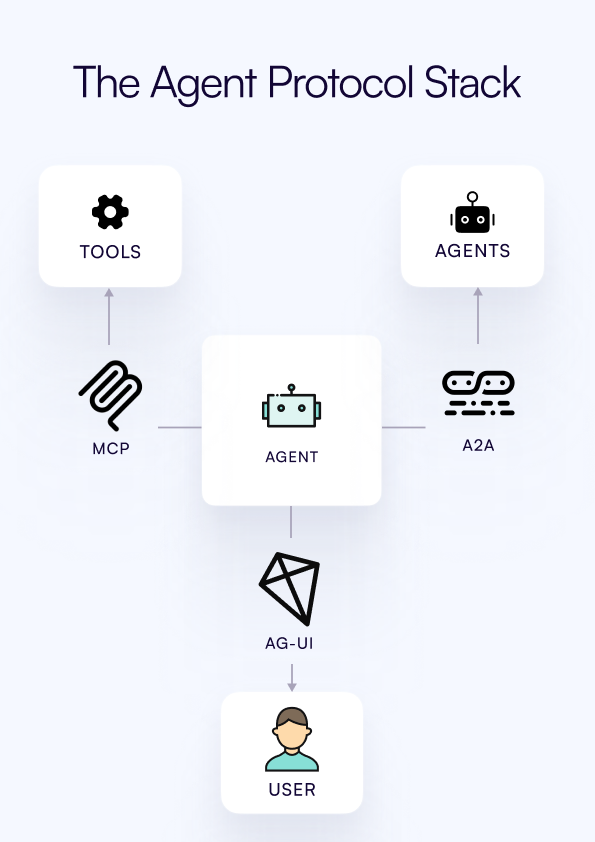
- MCP protocol: A communication protocol that standardizes how Agents call tools
- A2A protocol: A communication protocol that standardizes collaboration between Agents
- AG‑UI protocol: A communication protocol that standardizes the interaction interface between Agents and users
In plain terms, the AG‑UI protocol abstracts the interaction between an Agent and the user interface into an event stream. A single Agent invocation starts with RunStarted and ends with RunFinished or RunError; during the run, text deltas, tool calls, and state synchronization are continuously sent to the frontend as typed events.
Event Model
The AG‑UI protocol uses an event-driven model with clearly grouped event types, including lifecycle, text messages, tool calls, state management, and extension events. Multiple event types within each group work together to build a complete cycle.
- Lifecycle events:
RunStarted,RunFinished,RunError - Text message events:
TextMessageStart,TextMessageContent,TextMessageEnd - Tool call events:
ToolCallStart,ToolCallArgs,ToolCallEnd,ToolCallResult - State synchronization events:
StateSnapshot,StateDelta,MessagesSnapshot - Extension event:
Custom
From the perspective of an event stream, a typical event sequence starts with RunStarted. While generating content, the Agent pushes deltas with TextMessageContent; when a tool is needed, it first announces the call with ToolCallStart, then pushes ToolCallArgs, and sends back ToolCallResult after the tool completes; finally, the sequence ends with RunFinished.
For example, the SSE frames roughly look like this, where the data: content is a single event in JSON format.
Open Source Ecosystem
AG‑UI provides SDKs for multiple languages, including TypeScript, Python, Golang, Kotlin, and Java.
Agent frameworks such as LangGraph, CrewAI, Agno, and ADK have already integrated with AG‑UI through official or community-maintained adapters and can output AG-UI protocol event streams.
On the frontend, clients that implement the AG‑UI protocol, such as @ag-ui/client and CopilotKit, can be used to consume events.
In addition, we have also contributed improvements to the Go SDK in the official AG-UI repository.
- feat: add http.Flusher fallback for SSEWriter in Golang SDK
- fix: event missing EventTypeToolCallResult
For more supported cases, see the official documentation.
Quick Integration
Agent Development
The following example builds an Agent with a calculator tool.
Start an AG-UI Service over HTTP
The AG-UI service exposes a standard HTTP Handler. The integration process mainly consists of three steps.
- Create a framework Runner.
- Create an AG-UI service with
agui.New. - Start the HTTP service with
http.ListenAndServe.
At this point, we have developed the Agent and started the AG-UI service. The complete code is available in examples/agui/server/default.
CopilotKit Joint Debugging
When developing the frontend with CopilotKit, users can interact with the Agent in the frontend after setting the backend AG-UI service address. The complete code is available in examples/agui/client/copilotkit.
!videoagui.mp4
Core Concepts
Overall Design
In tRPC-Agent-Go, AG‑UI mainly consists of the following modules.
- Adapter: Defines the structure of the frontend request body
RunAgentInput. - Translator: Translates internal events into AG‑UI events.
- Runner: Processes the request body, runs the Agent, invokes the Translator, and so on.
- Service: Provides an HTTP Handler, accepts requests, and sends AG-UI event responses. It provides an SSE transport implementation by default and can also be customized for other communication protocols.
sequenceDiagram
    participant UI as Frontend
    participant SVC as AG‑UI Service
    participant RN as Runner
    participant TR as Translator
    participant AG as Agent
    UI->>SVC: POST /agui
    activate SVC
    SVC->>RN: RunAgentInput
    RN->>AG: UserID, SessionID, UserMessage
    AG-->>RN: Internal event stream
    RN->>TR: Internal event
    TR-->>RN: AG-UI event
    RN-->>SVC: AG-UI event stream
    SVC-->>UI: SSE frames
    deactivate SVC
This sequence diagram shows the default SSE path of AG‑UI: the frontend sends a POST /agui request to the AG‑UI Service, and the Service passes RunAgentInput to the Runner; the Runner calls the underlying Agent with UserID, SessionID, and the user message, then passes each generated internal event to the Translator, which translates it into an AG‑UI event; these events are returned to the Runner and streamed by the Service to the frontend as SSE frames. Through this loop, the Agent's reasoning process can be presented in the UI in real time.
Adapter
The frontend request body is defined in server/agui/adapter. The core structure is as follows.
- ThreadID is the session identifier and corresponds to the framework-level SessionID.
- RunID is the identifier of this invocation and corresponds to the framework-level InvocationID.
- Messages stores the conversation between the user and the Agent.
- State is used to carry session state.
- ForwardedProps stores business-side extension fields, such as the user ID.
Translator
The Translator interface provides the Translate method, which translates internal events into AG-UI events.
The specific event translation logic is as follows.
- Before the Agent starts running, a
RunStartedAG-UI event is sent; after a normal run finishes, aRunFinishedAG-UI event is sent; if an error occurs in the middle, aRunErrorAG-UI event is sent. - Internal text events are translated into
TextMessageStart,TextMessageContent, andTextMessageEndAG-UI events. - Internal tool call and execution result events are translated into
ToolCallStart,ToolCallArgs,ToolCallEnd, andToolCallResultAG-UI events.
In addition, you can implement a custom Translator for custom events or reporting to an observability platform.
Runner
The AG-UI Runner wraps the framework Runner. It receives the frontend request body RunAgentInput, invokes the Agent to run, passes the generated internal events to the Translator for translation into AG-UI events, and then returns them to the upper-level Service.
Service
Service exposes an HTTP Handler, calls the AG-UI Runner, and sends AG-UI events to the frontend.
The framework provides an SSE implementation by default and also allows custom Service implementations to extend it to other communication protocols such as WebSocket.
Usage
Custom Communication Protocol
The AG-UI protocol does not mandate a communication protocol. The framework uses SSE as the default communication protocol for AG-UI. If you want to switch to another protocol such as WebSocket, you can implement the service.Service interface:
Custom Translator
The default translator.New translates internal events into the standard event set defined by the protocol. If you want to append custom information while preserving the default behavior, you can implement the translator.Translator interface and use AG-UI's Custom event type to carry extension data:
For example, when using React Planner, if you want to apply different custom events to different tabs, you can implement a custom Translator to achieve this.
!videoreact2.mp4
The complete code example is available in examples/agui/server/react.
Custom UserIDResolver
By default, all requests are assigned to the fixed "user" user ID. You can customize UserIDResolver to extract UserID from RunAgentInput:
Event Translation Callbacks
AG-UI provides an event translation callback mechanism, making it easy to insert custom logic before and after the event translation process.
translator.BeforeTranslateCallback: Triggered before an internal event is translated into an AG-UI event. Return value conventions:- Return
(customEvent, nil): UsecustomEventas the input event for translation. - Return
(nil, nil): Keep the current event and continue executing subsequent callbacks. If all callbacks returnnil, the original event is ultimately used. - Return an error: Terminate the current execution flow, and the client will receive
RunError.
- Return
translator.AfterTranslateCallback: Triggered after the AG-UI event translation is complete and before it is sent to the client. Return value conventions:- Return
(customEvent, nil): UsecustomEventas the final event sent to the client. - Return
(nil, nil): Keep the current event and continue executing subsequent callbacks. If all callbacks returnnil, the original event is ultimately sent. - Return an error: Terminate the current execution flow, and the client will receive
RunError.
- Return
Usage example:
Event translation callbacks can be used in many scenarios, such as:
- Custom event handling: Modify event data during event translation and add extra business logic.
- Monitoring reporting: Insert custom monitoring reporting logic before and after translation.
RunAgentInput Hook
When the AG-UI frontend request body RunAgentInput cannot fully meet user requirements, you can place extra content into the extension field ForwardedProps and use WithRunAgentInputHook to rewrite the request body uniformly. The following example shows how to read a prompt from ForwardedProps and merge it into the last user message:
- Returning
nilkeeps the original input but preserves in-place modifications. - Returning a custom
*adapter.RunAgentInputoverrides the original input; returningnilmeans the original input is used. - Returning an error aborts the current request, and the client receives a
RunErrorevent.
Summary
The AG-UI protocol abstracts the interaction between users and Agents into a unified event protocol, and tRPC-Agent-Go provides a complete engineering practice for it, with clear paths from minimal integration to customized extensions. Through this article's overview of the AG-UI protocol, integration examples, core module breakdown, and usage guide, you can quickly integrate the AG-UI protocol into existing projects and build a stable, observable Agent frontend-backend path with a streaming experience.
References
Usage and Communication
You are welcome to use the tRPC-Agent-Go framework. For detailed documentation and examples, please visit the tRPC-Agent-Go repository.
The growth of tRPC-Agent-Go depends on everyone's support. You are welcome to Star the project and join the community in building it together.
You are welcome to discuss framework usage experience, share best practices, and suggest improvements through GitHub Issues. Let's work together to advance Go in the field of AI Agents.