Real-Time Conversation Route
Core Concepts
The real-time conversation route handles a real-time conversation request and pushes the event stream produced during execution to the frontend through SSE. The default route is /, and it can be customized with agui.WithPath. To configure a shared route prefix, see Route Prefix.
Note that the same SessionKey (AppName + userID + sessionID) can only have one real-time conversation request running at a time. Repeated requests return 409 Conflict.
Even if the frontend SSE connection is closed, the backend continues running until it finishes normally, is canceled, or times out. By default, a single request can run for at most 1 hour. You can adjust this with agui.WithTimeout(d), and setting it to 0 disables the timeout. The effective timeout is the smaller value between the request context deadline and agui.WithTimeout(d).
For a complete code example, see examples/agui/server/default.
RunAgentInput Request Body
RunAgentInput is the request body used by AG-UI server routes. The real-time conversation, message snapshot, and cancel routes all use it to pass session and run information. The real-time conversation route mainly reads tail input from messages:
- When the tail message is
role=user, it starts the run with user input. - When the tail messages are consecutive
role=toolmessages, it continues the conversation with external tool results.
For the full field definition, see the AG-UI Go SDK.
Text Input
When starting a real-time conversation request, the tail role=user message in messages carries the current user input in string content. The server converts this message into the input for the current agent run.
The corresponding curl example:
Multimodal Input
Multimodal input uses the tail role=user message in messages to represent the current user input. Unlike text input, content is no longer a string. It is an array of InputContent fragments. Each item represents one piece of input. Common types include:
- Text fragment:
typeis"text", and the text content is in thetextfield. - Binary fragment:
typeis"binary". Useurlfor image or file URLs, or usedatafor base64 content. Provide an accuratemimeTypewhen possible; when passing a file, providefilenamewhether you useurlordata.
URL request body example:
DATA request body example:
The url form is for image or file URLs that the selected model can access. When using data, the server decodes it with standard base64 decoding. data can be either a raw base64 string or a string with the data:*;base64, prefix.
File URL request body example:
External Tool Result Input
After the previous event stream returns a tool call that needs external execution, the caller can request the real-time conversation route again and put one or more role=tool messages at the tail of messages. The server treats these consecutive tail tool messages as the current tool result input and passes them to the agent to continue the run.
Each role=tool message corresponds to one tool call result. toolCallId associates the result with the tool call from the previous event stream, name is the tool name, and content carries the tool output as a string. id becomes the message id when the server returns the TOOL_CALL_RESULT event.
Framework-supplied Assistant Messages
When the backend has already generated the final reply and no model call is needed, the tail message in messages can use role=assistant with non-empty string content. The Runner appends it to an existing session that already contains a real role=user message, persists it to the session transcript and AG-UI track, and does not invoke the underlying Agent. On success, SSE returns only RUN_STARTED and RUN_FINISHED; persistence failures return RUN_STARTED and RUN_ERROR.
An assistant-only new session fails instead of fabricating a user message, so the history start boundary remains the first real user message.
RunAgentInput Hook
RunAgentInput Hook runs before the AG-UI Runner handles a request. It is used to normalize or rewrite RunAgentInput consistently. The real-time conversation, message snapshot, and cancel routes all use the request body after Hook processing.
The Hook receives the current RunAgentInput and can return the original request body, the original request body modified in place, or a new RunAgentInput. If you only need to parse UserID, AppName, State, or run options, prefer the corresponding Resolver described later.
The following example demonstrates compatibility with a legacy business field. Old requests put user input in forwardedProps.legacy_message. When messages is empty, the Hook fills in a role=user message.
Key points:
- Returning a custom
*adapter.RunAgentInputuses the new request body for subsequent processing. - Returning
nilkeeps the original request body. If the Hook modified the original object in place, those changes are preserved. - Returning an error aborts the request, and the client receives a
RunErrorevent.
Custom UserIDResolver
By default, AG-UI assigns every request to the fixed user ID "user". UserIDResolver parses the business user identifier from RunAgentInput, and the parsed value participates in session lookup. The real-time conversation, message snapshot, and cancel routes reuse the same resolution logic, so related requests for the same session must resolve to the same UserID.
Custom AppNameResolver
AppName participates in session lookup together with UserID and threadId. By default, AG-UI uses the static AppName configured by agui.WithAppName(name). To resolve the application identifier per request, implement AppNameResolver and inject it with agui.WithAppNameResolver.
When AppNameResolver returns a non-empty string, that value is used as the AppName for the request. When it returns an empty string, the framework falls back to agui.WithAppName(name). The real-time conversation, message snapshot, and cancel routes reuse the same resolution logic, so related requests for the same session must resolve to the same AppName.
The resolved AppName is the canonical session boundary for an AG-UI request. During a real-time run, AG-UI passes it to the underlying Runner as agent.WithAppName, keeping the Runner session key consistent with AG-UI track events, message snapshots, and cancel routing.
When message snapshots are enabled, configure agui.WithAppName(name) as the default value.
Custom RunOptionResolver
RunOptionResolver adds agent.RunOption for the current agent run. It runs for every request, and the returned options only affect that run. The AG-UI runner still maps request input.Tools to caller-executed tools after the custom resolver returns.
Do not return agent.WithAppName from RunOptionResolver to configure AG-UI session ownership. AG-UI AppName should come from agui.WithAppName or agui.WithAppNameResolver; when the resolved AppName is non-empty, it overrides any agent.WithAppName set by RunOptionResolver.
Custom StateResolver
By default, object-shaped RunAgentInput.State is merged into RuntimeState for the current run. Existing RuntimeState keys are preserved, while AG-UI state wins when the same key is present in both maps. Non-object state is not projected automatically.
StateResolver customizes this conversion when the state must be filtered, renamed, or converted. Its returned map is merged into RuntimeState with agent.MergeRuntimeState(...) and only affects the current run. AG-UI state is supplied by the client; filter security-sensitive values instead of treating them as trusted server context.
An LLMAgent can read a resolved value in its Instruction or SystemPrompt with a {runtime:key} placeholder. Use {runtime:key?} when the value is optional.
Returning nil means no state is merged. Returning an empty map does not add any values.
Run Hook
RunHook is for real-time conversation runs where server-side background logic proactively pushes AG-UI events to the frontend at its own pace. It is used for server-initiated UI status updates, rather than translating internal events that the Agent has already produced into AG-UI events; use a custom Translator or event translation callbacks for the latter.
After RUN_STARTED is sent, AG-UI creates the Run for the current request, binds it to the execution ctx, starts RunHook, and then calls the underlying Runner. A hook can use the run argument directly. Agent, Tool, or other business code that runs with the same ctx can retrieve the same Run through aguirunner.RunFromContext(ctx). Events sent with run.Emit(ctx, event) are written into the SSE stream for the current request. If SessionService is configured, these events are also written to AG-UI history and can be restored through the message snapshot route. They are not written to normal session events, so they do not become model context in later runs.
The following example shows a background report task that pushes generation progress every 100ms. For the complete example, see examples/agui/server/runhook. For proactive progress updates from GraphAgent nodes, see examples/agui/server/graph_progress.
When Agent or Tool code needs to push events proactively, do not store Run in state yourself. If the code receives the ctx for the current run, read it from ctx.
If the background task needs business fields from the current request, call run.Input() to get the RunAgentInput, for example to read business parameters from forwardedProps. Treat the request body as read-only in the hook, and do not keep rewriting it after the run has started.
run.Emit is for UI events proactively produced by the server. It should not send framework-owned events such as RUN_STARTED, RUN_FINISHED, RUN_ERROR, or MESSAGES_SNAPSHOT. If the Agent finishes before the hook, the framework waits for the hook to return before sending the final run terminal event, so UI events pushed from the hook do not appear after the terminal event. The hook should honor ctx.Done() and return promptly when the run is canceled or times out. If the hook returns an error, the current AG-UI run returns RUN_ERROR.
Custom Translator
Translator converts internal framework events into AG-UI events. The built-in Translator translates internal framework events into standard events defined by the AG-UI protocol, maintains streaming event state, and finalizes open streams when a run ends. A custom Translator can implement this conversion independently or wrap the built-in Translator to extend event output while preserving the default translation and finalization logic.
A custom Translator is usually injected through aguirunner.WithTranslatorFactory. The factory creates a Translator at the start of each run, so the Translator can maintain state within that run.
If a custom Translator generates streaming events that need to be closed when the run ends, or if it wraps the built-in Translator, implement translator.PostRunFinalizingTranslator so the framework can fill in the required finalization events at the end of the run.
PostRunFinalizationEvents is called during the finalization phase after the run ends. If it returns an error, the framework tries to send the finalization events already returned and sends a RunError to the client.
For example, when using React Planner, you can implement a custom Translator to apply different custom events to different tags, as shown below.
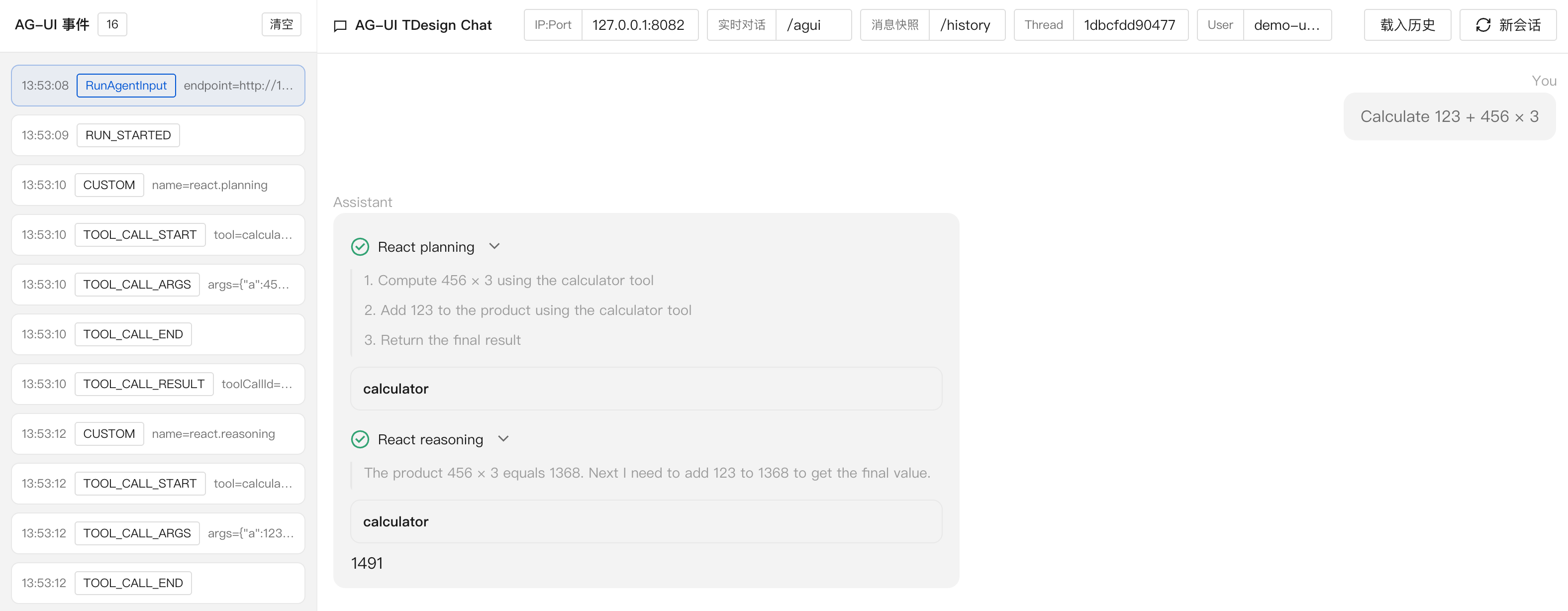
For the complete code example, see examples/agui/server/react.
Event Translation Callbacks
Event translation callbacks run custom logic before and after the built-in Translator translates a single event.
translator.BeforeTranslateCallback runs before an internal framework event enters the Translator and can replace the internal event used for this translation. translator.AfterTranslateCallback runs after an AG-UI event is generated and before it is sent to the client, and can replace the AG-UI event that will be sent.
Multiple callbacks run in registration order. The first callback that returns a non-nil event replaces the current event, and later callbacks no longer run. If all callbacks return nil, the original event is kept. If any callback returns an error, the request fails.
For a complete example integrated with Langfuse observability, see examples/agui/server/langfuse.
Connection Close Handling
By default, the SSE connection of a real-time conversation request is decoupled from the backend agent run. If a browser refresh, page close, or network interruption closes the SSE connection, the backend run does not stop immediately. It continues until it finishes normally, is canceled by the cancel route, or times out.
To cancel the backend run when the request context ends, enable agui.WithCancelOnContextDoneEnabled(true).
SSE Heartbeat Keepalive
Some gateways, load balancers, or browsers close SSE connections if no data is written for a long time. If an agent run may spend a long time without outputting events, enable SSE heartbeats.
After this is enabled, the server writes SSE comment frames :\n\n at the configured interval to keep the connection active. Heartbeats do not produce AG-UI events. This feature is disabled by default, and passing an interval less than or equal to 0 disables it.
Custom Transport
The framework uses SSE to transport AG-UI event streams by default. To use WebSocket or another transport, provide a custom service.Service. A custom Service receives HTTP requests, calls aguirunner.Runner, and writes the returned AG-UI events back to the client.
Reasoning Content
AG-UI uses REASONING_* events to represent reasoning content returned by the model. The frontend can display this content before the final answer. For related event definitions, see AG-UI Reasoning.
Streaming reasoning content usually forms the following event sequence:
The framework does not output reasoning content by default. After enabling agui.WithReasoningContentEnabled(true) when creating the Server, the Translator converts reasoning content returned by the model into REASONING_* events.
Streaming Tool Call Arguments
By default, the AG-UI server emits the complete TOOL_CALL_START → TOOL_CALL_ARGS → TOOL_CALL_END sequence after the model finishes producing a tool call. In other words, the frontend usually sees the tool arguments only after all arguments have been generated.
If tool arguments take noticeable time to generate, or if the frontend needs to show argument-generation progress before the tool starts running, enable streaming tool-call arguments. When enabled, the AG-UI server converts tool argument chunks produced by the model into multiple TOOL_CALL_ARGS events. The frontend can accumulate those chunks by toolCallId and render them incrementally.
This capability requires the underlying model adapter to support and enable tool call delta output. For the OpenAI adapter, enable both the model-layer and AG-UI-layer switches:
Both switches are required:
openai.WithShowToolCallDelta(true): the OpenAI adapter stops filtering raw streamingtool_callschunks and converts them into the framework's internal tool-call deltas.agui.WithToolCallDeltaStreamingEnabled(true): the AG-UI server converts those chunks into realtimeTOOL_CALL_ARGSevents.
Other model adapters are handled the same way if they also support the framework's internal tool-call deltas.
When enabled, the realtime event stream for a single tool call usually looks like this:
Frontend handling only needs to follow two rules:
TOOL_CALL_ARGS.deltais the newly produced argument string fragment, not necessarily valid complete JSON. Accumulate it bytoolCallIdbefore parsing.TOOL_CALL_ARGSevents for the same tool call are not guaranteed to be contiguous in the event stream. Maintain frontend state bytoolCallId, not by adjacent events.
When the tool call ends, the AG-UI server emits TOOL_CALL_END. If the run is cancelled or ends with an error, the server also tries to close any still-open protocol events so the frontend does not remain in an unfinished state.
The realtime route sends each TOOL_CALL_ARGS chunk to the frontend. If SessionService is configured, adjacent TOOL_CALL_ARGS events with the same toolCallId are aggregated before they are written into the session. The message snapshot route restores the accumulated tool arguments; it does not preserve the number or boundaries of realtime chunks.
For a complete example, see examples/agui/server/toolcall_delta.
Streaming Tool Execution Results
StreamableTool returns streaming intermediate results during execution and a final result when it finishes. A tool can return tool.FinalResultChunk or tool.FinalResultStateChunk in the stream to specify the final result. If neither is returned, the framework converts the received ordinary streaming intermediate results into text and concatenates them in return order as the final result.
By default, the Translator converts both streaming intermediate results and final results into TOOL_CALL_RESULT, so the same tool call may produce multiple TOOL_CALL_RESULT events.
After enabling agui.WithStreamingToolResultActivityEnabled(true), streaming intermediate results are rewritten as Activity events with activityType set to tool.result.stream. When the tool finishes, the frontend still receives one final TOOL_CALL_RESULT.
This option is disabled by default. When it is not enabled, the real-time event stream for one tool call usually looks like this:
When enabled, the real-time event stream for one tool call usually looks like this:
Streaming intermediate results are sent as complete AG-UI Activity events. The first non-empty streaming intermediate result generates ACTIVITY_SNAPSHOT:
Later non-empty streaming intermediate results generate ACTIVITY_DELTA:
Activity events for the same tool call use the same messageId, and activityType is fixed to tool.result.stream. The patch.path in ACTIVITY_DELTA is fixed to /content, and its value is the full intermediate result content accumulated by the server. The frontend can overwrite the display with the latest Activity state.
The content source of the final TOOL_CALL_RESULT stays unchanged. If the tool stream does not return tool.FinalResultChunk or tool.FinalResultStateChunk, the final result is built by concatenating received ordinary streaming intermediate results in order. If the stream returns either of those chunks, the final result directly uses its Result.
The message snapshot route does not save these streaming intermediate Activity events. When restoring history through the message snapshot route, each tool call keeps only one final tool message, and its content matches the final TOOL_CALL_RESULT from the real-time conversation route.
For a complete example, see examples/agui/server/streamtool.
Event Source Metadata
In multi-agent or sub-agent stream forwarding scenarios, one AG-UI event stream may contain text, tool calls, tool results, and Activity events from different agent invocations. When event source metadata is enabled, the framework writes source information from internal events into the rawEvent field of AG-UI events. Callers can use this to identify event sources and restore frontend grouping state.
This feature is disabled by default and can be enabled with agui.WithEventSourceMetadataEnabled(true):
After this is enabled, AG-UI events generated by the Translator carry rawEvent when non-empty source information exists. Example:
The top-level timestamp on a real-time AG-UI event is the protocol event timestamp in Unix milliseconds. author indicates the event author and is usually used to group by agent or member. invocationId identifies the current execution, parentInvocationId identifies the parent execution, and branch identifies the current execution's branch in the call chain. When the same agent name appears multiple times in a single run, branch can distinguish different execution branches.
parentMetadata describes the immediate parent edge that triggered this invocation:
triggerType: the kind of parent trigger. Currentlytool_call(an AgentTool invocation) ortransfer(atransfer_to_agenthandoff).triggerId: the parent'stoolCallId. This is the join key against the parent'sTOOL_CALL_STARTevent. Use it to attach a sub-agent's events to the exactTOOL_CALL_STARTthat spawned them.triggerName: a human-readable trigger name. Fortool_callit is the AgentTool name; fortransferit istransfer_to_agent.
parentMetadata is necessary because parentInvocationId only identifies the parent execution, not the specific tool call inside it. When a model issues parallel AgentTool calls to the same sub-agent in one turn, all spawned invocations share the same parentInvocationId; only parentMetadata.triggerId can disambiguate which TOOL_CALL_START each child invocation belongs to. When the parent did not invoke this child via a tool call (e.g., a top-level run), parentMetadata is absent.
The MESSAGES_SNAPSHOT event returned by the message snapshot route can also carry source information. In this case, rawEvent is not source information for one event, but a source index built by message, tool call, and run:
When restoring historical messages, use rawEvent.messages[messageId] to get the message source and timestamp, or rawEvent.toolCalls[toolCallId] to get the tool call source and timestamp. To restore request-level forwardedProps, read rawEvent.runs[runId].forwardedProps. The indexed timestamp first reuses the top-level timestamp from the historical real-time event; only old data without an event timestamp falls back to the persisted track event time. Source information in the index uses the same fields as rawEvent in real-time events, so the frontend can reuse those field semantics to restore grouping state.
External Tools
External tools are used when tool calls are executed by the caller. The AG-UI server does not directly run these tools, but it still lets the agent generate tool calls, sends call information to the caller, receives tool results, and passes those results back to the agent to continue running.
The general flow is:
- The agent generates a tool call, and the AG-UI event stream returns
toolCallIdand arguments. - The caller executes the tool.
- The caller sends the tool result back with a subsequent request, represented as a
role=toolmessage. - The AG-UI server sends
TOOL_CALL_RESULT, writes it to session history, and passes the tool result to the agent to continue running.
Two server-side forms are currently supported. When directly wrapping an llmagent.Agent, use LLMAgent External Tool mode. When external execution belongs to a GraphAgent and must resume from a checkpoint, use GraphAgent Interrupt mode. GraphAgent Interrupt mode covers the graph topologies described below.
LLMAgent External Tool Mode
Use this mode when the AG-UI server directly wraps an llmagent.Agent and only some tools need to be executed by the caller. If the external tools are already registered with the Agent, RunOptionResolver can return agent.WithToolExecutionFilter(...) to declare which tools are not executed on the server. If the frontend or upstream service declares tools in AG-UI input.Tools, the default AG-UI runner converts them to agent.WithExternalTools(...) and injects them into runner.Run.
The first request uses role=user. When the model generates a tool call that must be executed by the caller, the event stream outputs TOOL_CALL_START, TOOL_CALL_ARGS, and TOOL_CALL_END, then ends the current run after that assistant tool-call response. The caller reads toolCallId and tool arguments from the event stream, executes the tool, and starts a second request with a role=tool message.
The second request keeps the same threadId and uses a new runId. The tail of messages can contain one or more role=tool messages, one result per toolCallId. The AG-UI server generates the current-turn tool result input in the order of the tail tool messages and drives the agent to continue running.
Code snippet:
By default, the AG-UI runner converts AG-UI input.Tools to declaration-only
trpc-agent-go tools, passes them with WithExternalTools, exposes them to the
model, and defers execution to the caller. If a dynamic declaration has the same
name as an existing server tool, the existing server tool wins and the dynamic
declaration does not override or intercept it.
This automatic mapping also applies when WithRunOptionResolver is used; the
custom resolver only needs to return additional run options.
For the complete LLMAgent example, see the server implementation in examples/agui/server/externaltool/llmagent, and the frontend client in examples/agui/client/tdesign-chat.
LLMAgent request examples:
First request (role=user):
Second request (role=tool):
LLMAgent event stream example:
GraphAgent Interrupt Mode
Use this mode when external execution belongs to a GraphAgent node and the backend needs to resume from a graph checkpoint. The corresponding graph node calls graph.Interrupt to pause execution and wait for the caller to send back the result. After the server enables agui.WithGraphNodeInterruptActivityEnabled(true), the graph.node.interrupt event carries lineageId and checkpointId, which the caller uses to locate the resume point for the next request.
The first request uses role=user. The LLM node outputs TOOL_CALL_START, TOOL_CALL_ARGS, and TOOL_CALL_END; then the graph enters the tool node that triggers the interrupt, outputs ACTIVITY_DELTA graph.node.interrupt, and closes the current SSE stream after RUN_FINISHED. The caller gets the external tool toolCallId, tool arguments, lineageId, and checkpointId from the event stream.
The second request uses role=tool. The request's toolCallId corresponds to the tool call from the first request, content is the tool output string, and forwardedProps.lineage_id plus forwardedProps.checkpoint_id come from the lineageId and checkpointId returned by the first interrupt event. RunOptionResolver converts the tool result into graph resume information, usually by passing graph.Command{ResumeMap: ...} to GraphAgent. The server sends TOOL_CALL_RESULT, writes it to session history, resumes from the corresponding checkpoint, and continues generating the final answer.
The resume contract is defined by GraphAgent. The interrupted node consumes the returned result through the ResumeMap key. A single pending tool call corresponds to one tool result. If one interrupt contains multiple pending tool calls, their results are consumed by the graph-level ResumeMap contract. When a graph mixes server-executed tools and caller-executed tools, split them into separate stages so the interrupt node only handles caller-provided results while internal tool execution remains on the normal graph tools path.
Request and Event Shape
GraphAgent request examples:
First request (role=user):
Second request (role=tool):
GraphAgent event stream example:
Regular Node Interrupts
Use this form when the interrupt is emitted by a regular node in the current GraphAgent. This node usually sits after an LLM node, reads the tool call produced by the previous node, and calls graph.Interrupt to wait for the caller to send back the tool result. After resume, the node writes the tool result back into graph state and the graph continues.
Code snippet:
graphResumeInput reads forwardedProps.lineage_id and forwardedProps.checkpoint_id, then converts consecutive tail role=tool messages into ResumeMap.
For the complete GraphAgent example, see the server implementation in examples/agui/server/externaltool/graphagent, and the frontend implementation in examples/agui/client/tdesign-chat.
AgentNode Child LLMAgent External Tools
Use this form when the tool call comes from an AgentNode child LLMAgent, but the interrupt is still emitted by a regular node in the parent graph. The child LLMAgent gets the external tool declaration through graph.WithAgentNodeRunOptions(agent.WithExternalTools(...)); the parent graph stores the child Agent's tool call with graph.WithSubgraphOutputMapper(...); then a following regular node calls graph.Interrupt to wait for the caller to send back the tool result. After resume, the parent graph passes the result back to the same AgentNode as model.NewToolMessage(...).
Code snippet:
storeResearchResult writes the child Agent's tool call into parent graph state. mapExternalToolMessage projects the tool message generated after resume to graph.StateKeyAgentInputMessage.
Complete example: examples/agui/server/externaltool/agentnode_llmagent.
AgentNode Child GraphAgent Interrupts
Use this form when a parent GraphAgent calls a child GraphAgent through an AgentNode and the interrupt is emitted by a node inside the child GraphAgent. The child graph interrupt bubbles up and the parent graph also enters the interrupt state. Resume still starts from the parent checkpoint, and the framework continues from the corresponding child graph checkpoint.
Code snippet:
buildParentGraph defines two AgentNodes in the parent graph, and buildResearchGraph defines the LLM node and interrupt node inside the child GraphAgent. agui.WithGraphNodeInterruptActivityTopLevelOnly(true) exposes only the parent graph interrupt activity to the frontend. The caller resumes with the lineageId and checkpointId returned by the parent graph.
Disable TopLevelOnly if the frontend needs to observe the child graph's own interrupt activity.
Complete example: examples/agui/server/externaltool/agentnode_graphagent.
AgentTool Child GraphAgent Interrupts
Use this form when a parent GraphAgent runs agenttool.NewTool(childGraphAgent) in a ToolsNode, and the interrupt is emitted by a node inside the child GraphAgent. Unlike AgentNode execution, the child graph enters the parent graph as a normal tool call. From the parent graph's point of view, the interrupt point is the ToolsNode currently running AgentTool, but the actual graph.Interrupt(...) call happens inside the child GraphAgent node. When it interrupts, the parent ToolsNode checkpoint records the AgentTool child graph checkpoint metadata. After the caller receives the external result, it resumes with a subsequent AG-UI request instead of continuing within the same SSE run. On resume, the caller still passes only the parent graph lineage_id and parent graph checkpoint_id, then writes the tool result into state.resume_map with the key used by the child graph's graph.Interrupt. The framework routes that value to the corresponding child graph checkpoint.
Code snippet:
After nodeExecuteTools completes, the graph returns to nodeCallReviewGraph, so the same LLM node consumes the tool message returned by AgentTool and generates the final response. A separate final-answer node is not required. resolveRuntimeState converts state.lineage_id, state.checkpoint_id, and state.resume_map from the AG-UI request into GraphAgent runtime state. state.checkpoint_id should be the parent graph ToolsNode interrupt checkpoint. The child graph checkpoint is resumed internally by AgentTool, so AG-UI callers should not pass the child checkpoint. The state.resume_map key should be the key passed to the child graph's graph.Interrupt, such as childInterruptKey in the snippet above.
If the frontend also needs to observe inner graph events, enable agenttool.WithStreamInner(true) when constructing the AgentTool. If it only consumes the parent graph's graph.node.interrupt activity, the default configuration is enough.
Complete example: examples/agui/server/externaltool/agenttool_graphagent_graphagent. If the outer flow first uses an AgentNode to produce a handoff tool call, and then the parent graph selects an AgentTool to execute it, see examples/agui/server/externaltool/agentnode_handoff_agenttool.
AG-UI role=tool Input Handling
For the role=tool input request structure, see External Tool Result Input. The AG-UI server reads consecutive tail role=tool messages from messages as the current tool result input batch.
If one event stream returns multiple tool calls that need caller execution, the subsequent request can place multiple role=tool messages at the tail of messages in order, one per toolCallId.
When RunOptionResolver also returns agent.WithUserMessageRewriter, the user rewriter runs first. Non-tool messages returned by the rewriter are retained before the final tool result block. A tool message returned by the rewriter replaces the request result for the corresponding AG-UI toolCallId. AG-UI places the final tool result block in the order of the tail tool messages from the request.
To echo role=tool input through the Translator, enable agui.WithToolResultInputTranslationEnabled(true). When enabled, the AG-UI server first normalizes each tool result input into an internal event and then passes it to the Translator, as shown below.
GraphAgent Node Activity Events
In GraphAgent scenarios, a single run usually executes multiple nodes in a graph. The framework can send extra Activity events so the frontend can display node execution progress and render Human-in-the-Loop interrupt state. This feature is disabled by default and can be enabled as needed when creating an AG-UI Server.
For the ACTIVITY_DELTA event format, see the official AG-UI documentation.
Node Lifecycle (graph.node.lifecycle)
Node lifecycle events represent graph node execution phases. Enable them with agui.WithGraphNodeLifecycleActivityEnabled(true) when creating the AG-UI Server:
After this is enabled, the node sends ACTIVITY_DELTA in the start, complete, and error phases. activityType is fixed to graph.node.lifecycle, and patch writes the current node state through add /node, where phase indicates the concrete phase and error only appears on failure.
Examples:
Node start phase (phase=start):
Node successful completion phase (phase=complete):
Node failure completion phase (phase=error):
The frontend can use /node.nodeId to locate the node and /node.phase to update display state. For example, highlight the node when phase=start, mark it as complete when phase=complete, and show /node.error when phase=error.
Interrupt State (graph.node.interrupt)
Interrupt state events represent graph pause and resume state. Enable them with agui.WithGraphNodeInterruptActivityEnabled(true):
When a node calls graph.Interrupt(ctx, state, key, prompt) and no resume input is currently available, the framework sends ACTIVITY_DELTA. activityType is fixed to graph.node.interrupt, and patch writes interrupt information through add /interrupt, including nodeId, key, prompt, checkpointId, and lineageId:
This event means execution is paused at the current node. The frontend can render /interrupt.prompt as the interrupt prompt and use /interrupt.key to decide which resume value to provide. checkpointId and lineageId can locate the checkpoint to resume and correlate multiple runs.
When a new run starts with resume input, the AG-UI Server sends a resume acknowledgement at the beginning of that run's event stream, before any graph.node.lifecycle events. The acknowledgement also uses activityType: graph.node.interrupt. It first sets /interrupt to null, then writes the current resume input through add /resume:
When using multi-level GraphAgents, subgraph interrupts bubble up, and the event stream may contain multiple graph.node.interrupt events by default. If the frontend only wants to keep the outermost interrupt used for resuming, additionally enable agui.WithGraphNodeInterruptActivityTopLevelOnly(true):
For a complete example, see examples/agui/server/graph. For frontend rendering and approval interactions, see examples/agui/client/tdesign-chat.
Observability Reporting
Observability platforms usually need to record the input, business tags, and final output of a conversation. AG-UI can add span attributes for the current agent run through RunOptionResolver, and can write the final result after streaming output ends together with event translation callbacks.
On the input side, return agent.WithSpanAttributes(...) from RunOptionResolver, and the framework writes those attributes to the agent entry span:
On the output side, accumulate text events in the AfterTranslate event translation callback, then write trace.output after output ends. This aligns frontend streaming events with backend traces for the same run, making it easier to inspect both input and final output in the observability platform.
For the Langfuse observability integration example, see examples/agui/server/langfuse.
Concurrent Message Streams
In multi-agent or sub-agent stream forwarding scenarios, a single real-time conversation event stream may contain multiple text messages being generated at the same time. For example, when a parent agent executes multiple AgentTools in parallel and the child agents all produce streaming output, text chunks from different child agents may arrive at the AG-UI server interleaved.
AG-UI message events use messageId to associate lifecycle events. When handling streaming messages, the frontend should maintain message state by messageId and merge TEXT_MESSAGE_CONTENT events with the same messageId into the same message.
By default, the AG-UI server keeps the compatible behavior: only one message stream stays open at a time. When later events switch to a new messageId, the Translator closes the current message stream before starting the new message stream. This behavior is suitable for frontends that render output as a linear stream.
The default event sequence looks like this:
If the frontend supports maintaining multiple open message streams by messageId, enable concurrent message streams:
After this is enabled, message streams with different messageId values can stay open at the same time. The same logical message keeps its lifecycle when chunks from other messages are inserted; later chunks with the same messageId continue to append to the original message until that message receives its own end event, or the run finalization phase fills in the end event.
The enabled event sequence looks like this:
Frontend handling needs to follow two rules:
TEXT_MESSAGE_CONTENTevents with the samemessageIdmay appear in different positions in the event stream. Accumulate content bymessageId.- The order of
TEXT_MESSAGE_ENDfor differentmessageIdvalues depends on the actual end order of those messages. Use theTEXT_MESSAGE_ENDevents in the stream as the end order.
Best Practices
Prefer server-side tool execution by default. Use the external tool pattern when a tool must run on the client side or business side. Treat this scenario as an advanced use case that should be designed and evaluated carefully.
Generating Documents
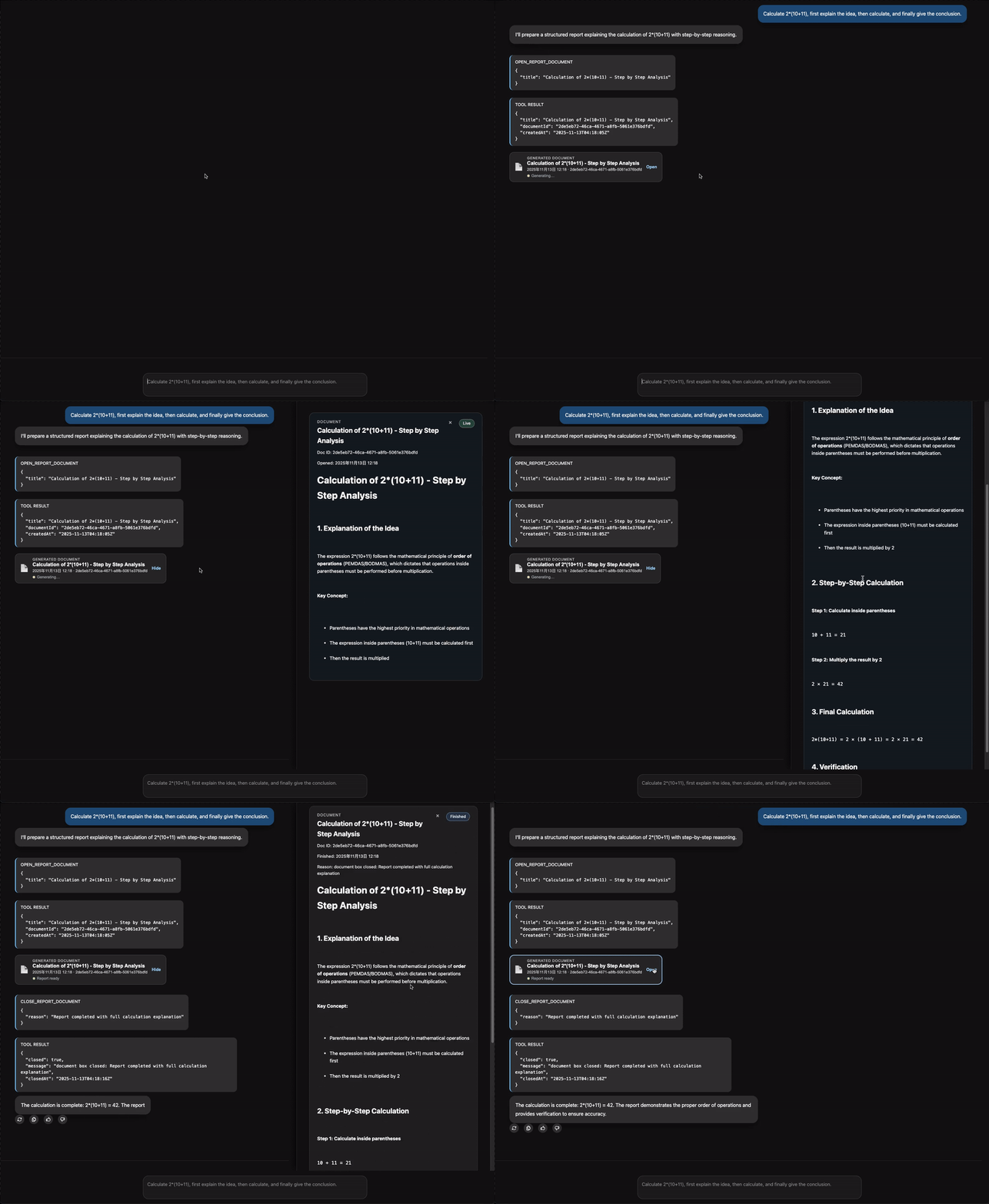
If a long document is inserted directly into the main conversation, it can easily flood the chat, and users may have trouble distinguishing conversation content from document content. To solve this, use a document panel to carry long-form documents. Define an AG-UI event stream workflow of "open document panel → write document content → close document panel" to move long documents out of the main conversation and avoid disrupting normal interaction. An example approach is:
-
Backend: define tools and constrain call order
Provide the Agent with two tools, open document panel and close document panel, and constrain the generation order in the prompt: when entering the document generation flow, execute in the following order:
- Call the "open document panel" tool first
- Output the document content immediately after that
- Call the "close document panel" tool last
Converted into an AG-UI event stream, it roughly looks like this:
-
Frontend: listen for tool events and maintain the document panel
Listen to the event stream on the frontend:
- When an
open_report_documenttool event is captured: create a document panel and write subsequent text message content into that panel. - When a
close_report_documenttool event is captured: close the document panel or mark it as complete.
- When an
The result is shown below. For the complete example, see examples/agui/server/report. For the frontend implementation, see examples/agui/client/tdesign-chat.